
Are you an Apple Watch enthusiast looking to fine-tune your workout sessions? Imagine having the power to edit your workout time with just a few taps, ensuring your fitness data reflects your true effort.
Whether you accidentally forgot to stop the timer or want to adjust your stats for accuracy, tweaking your workout time can make a world of difference. You might be wondering how to take full advantage of this feature and enhance your fitness tracking experience.
Dive into this article to discover how editing your workout time can help you achieve more precise results and keep you motivated on your fitness journey. Your Apple Watch is more than just a gadget; it’s your personal trainer on your wrist. Let’s explore how you can optimize its features to fit your lifestyle perfectly.
Adjusting Workout Time On Apple Watch
Adjusting your workout time on the Apple Watch can help you better track your exercise sessions and keep your fitness goals on point. Whether you want to tweak the duration during your workout or correct a completed session, the Apple Watch offers easy ways to manage your workout times. Understanding how to do this can save you from inaccurate data and help you stay motivated.
Accessing Workout Settings
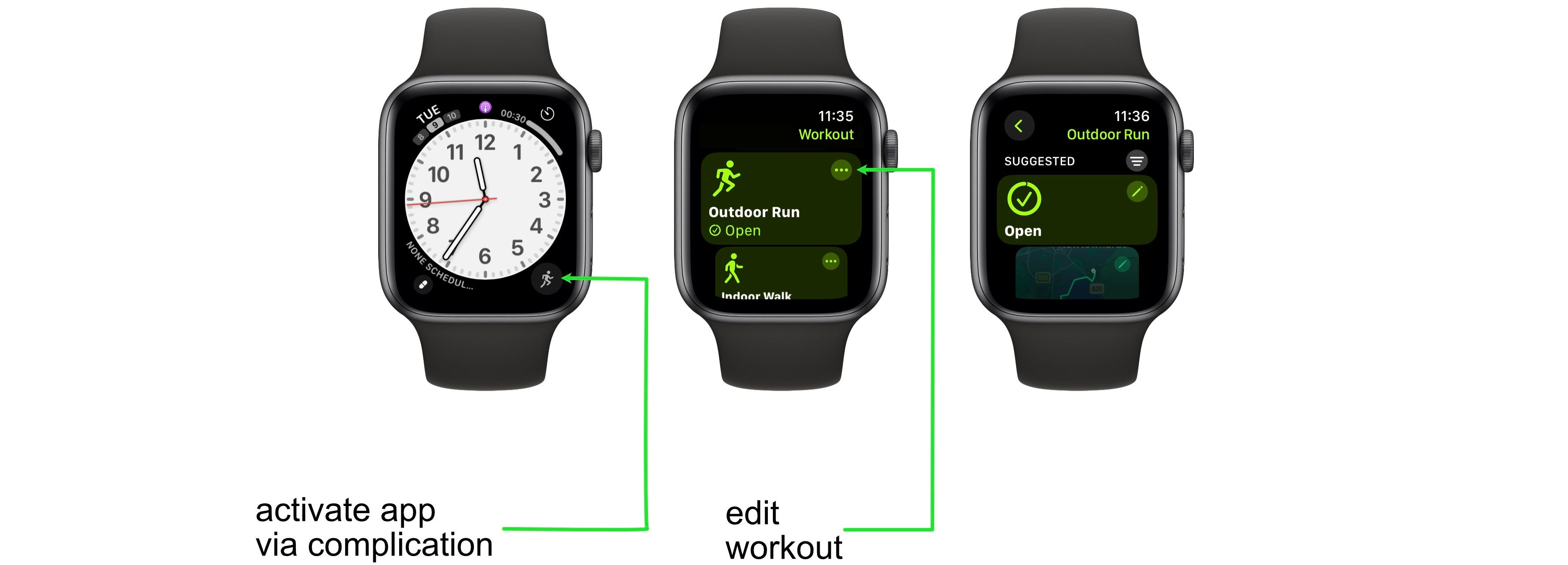
To adjust your workout time, start by accessing the workout settings on your Apple Watch. Open the Workout app and scroll to the workout type you want to use. Tap the three dots next to the workout to see options where you can set a specific goal, including duration.
Once you’re inside the settings, you can set a target time, distance, or calorie goal before starting. This helps you customize the workout to fit your needs exactly. Have you tried setting time goals before your workouts? It can really change how focused you feel during exercise.
Editing Duration During A Session
Sometimes your workout might start late or you need to pause and resume. You can edit the duration of your current workout directly on the watch. Swipe right on the workout screen and tap the pause button if you need to stop temporarily.
If you want to adjust the time while still exercising, use the Digital Crown to modify the timer if you set a fixed duration goal. This feature is handy for interval training or when you want to push a little longer than planned. Have you noticed how small time tweaks can boost your workout effectiveness?
Modifying Completed Workout Times
After finishing a workout, you may realize the recorded time isn’t accurate. You can edit completed workout times using the iPhone’s Health app linked to your Apple Watch. Open the Health app, find the workout entry, and tap “Edit” to change the duration.
Editing past workouts ensures your fitness data reflects your true performance. This accuracy helps when reviewing progress or sharing your stats with a coach or fitness app. Have you ever found discrepancies in your workout times that affected your tracking? Fixing them can make a big difference.

Credit: www.reddit.com
Using The Workout App Features
The Workout app on the Apple Watch offers useful tools to improve your exercise sessions. It helps track your progress and keeps you motivated. Using its features makes workouts more efficient and fun.
Setting Custom Workout Goals
Set goals for calories, distance, or time before starting a workout. This helps you focus and measure success clearly. Choose a goal that matches your fitness level and workout type.
Custom goals keep you motivated. They push you to complete each session with purpose.
Pausing And Resuming Workouts
Pause workouts anytime during your exercise. This is helpful if you need a break or must stop briefly. The watch saves your progress automatically.
Resume workouts easily by tapping the screen or pressing a button. This keeps your data accurate without starting over.
Auto-pause And Its Benefits
Auto-pause stops the workout when you stop moving. It restarts as soon as you begin again. This feature works well for running or cycling.
Auto-pause improves tracking accuracy. It prevents extra time or calories from being counted during breaks.
Tips To Improve Workout Accuracy
Improving the accuracy of your Apple Watch workouts can make a big difference in tracking your progress and reaching your fitness goals. Small adjustments to how you use the watch can lead to more reliable data. Let’s look at some practical tips to help you get the most accurate workout measurements.
Calibrating Your Apple Watch
Calibration helps your Apple Watch learn your stride and pace. To calibrate, take your watch for a 20-minute outdoor walk or run where GPS is available. This process fine-tunes the sensors so your watch can better estimate distance and calories in future workouts.
Have you noticed odd distance or calorie counts before? Calibration often resolves these issues by aligning your watch’s data with your real-world activity.
Wearing The Watch Correctly
How you wear your Apple Watch affects sensor accuracy. Make sure the watch fits snugly but comfortably on your wrist—too loose and the heart rate sensor may give inconsistent readings. Wearing it just above your wrist bone typically works best.
Check your watch during workouts to ensure it hasn’t shifted. A stable fit keeps the sensors in constant contact with your skin, improving heart rate and motion tracking.
Optimizing Gps And Heart Rate Sensors
GPS and heart rate sensors are key to workout accuracy. To optimize GPS, start your workout outdoors with a clear view of the sky. Buildings or dense trees can interfere with satellite signals and reduce tracking quality.
For heart rate monitoring, clean the back of your watch regularly to remove sweat and dirt that can block sensor light. Also, give your watch a moment to adjust when you start moving—sometimes the sensors need a few seconds to catch up.
Have you tried resetting your location services if GPS seems off? This simple step can refresh your watch’s connection and improve accuracy.
Credit: medium.com
Third-party Apps For Enhanced Tracking
Third-party apps can significantly improve how you track and edit your workout times on the Apple Watch. These apps often offer more flexibility and features than the native Workout app, letting you fine-tune your exercise data with greater accuracy. Have you ever finished a workout and realized the time recorded was off? These apps can help fix that and provide deeper insights into your performance.
Apps With Advanced Time Editing
Some third-party apps allow you to manually adjust workout durations after you finish exercising. Apps like Stravaand Runkeeperlet you tweak start and end times, so your stats reflect reality more closely.
- Modify workout time directly within the app
- Add missing segments or remove pauses
- Track multiple types of workouts, not just running or cycling
This precision can be a game-changer if your Apple Watch lost GPS signal or you forgot to pause your workout. Have you ever wished to fix those gaps? These apps answer that need.
Syncing Data With Apple Health
Most advanced workout apps integrate smoothly with Apple Health, ensuring your edited data syncs across your health ecosystem. This keeps all your metrics updated in one place, whether it’s calories burned, distance, or heart rate.
When you edit workout times in a third-party app, the changes reflect in Apple Health, helping you maintain accurate records. This connection can also improve recommendations from other health apps that use your workout data.
Choosing The Right App For Your Needs
Not all apps offer the same level of control or types of workouts. Think about what you want to track and how much editing flexibility you need before settling on an app.
- Do you want detailed time editing or simple adjustments?
- Are you tracking running, cycling, swimming, or multiple activities?
- Is syncing with Apple Health a must-have feature?
Testing a few apps can reveal which one fits your routine best. Which features matter most to you when managing your workout data?
Common Issues And Fixes
Editing workout time on your Apple Watch can sometimes lead to unexpected issues. These glitches might disrupt your tracking accuracy or cause frustration when your workout summary doesn’t reflect reality. Understanding common problems and their fixes helps you keep your fitness data reliable and your Apple Watch running smoothly.
Troubleshooting Time Discrepancies
Noticing that your workout duration doesn’t match the actual time spent exercising? This can happen if the watch’s sensors lag or if you pause the workout without properly resuming it.
- Check if your Apple Watch and iPhone have the latest software updates installed. Outdated software often causes syncing issues.
- Ensure you start and stop workouts manually if automatic detection doesn’t work well for your activity.
- Try calibrating your watch by walking or running outdoors with GPS enabled for about 20 minutes.
Have you ever stopped a workout but forgot to hit ‘end’? That alone can throw off your recorded time significantly.
Resetting Workout Data
If your workout records keep showing incorrect data, resetting might be necessary. This clears out corrupted data and can solve persistent errors.
- Go to the Watch app on your iPhone.
- Select “Privacy” and then tap “Reset Fitness Calibration Data.”
- After resetting, perform a few outdoor workouts to recalibrate your watch’s sensors.
Resetting won’t delete your activity history but will refresh how your watch calculates workouts. It’s a simple fix that often restores accuracy.
When To Contact Apple Support
If you’ve tried troubleshooting and resetting, but your workout times still don’t add up, it might be time to reach out for professional help.
- Persistent sensor errors or hardware malfunctions require expert diagnosis.
- Apple Support can guide you through advanced troubleshooting steps or arrange a repair if needed.
- Keep a note of your Apple Watch model and software version to speed up the support process.
Do you rely heavily on your Apple Watch for fitness tracking? Ignoring ongoing issues could impact your workout data and overall user experience. Don’t hesitate to seek help when things don’t improve.

Credit: www.reddit.com
Frequently Asked Questions
How Do I Edit Workout Time On Apple Watch?
Open the Workout app, select the workout, then swipe left and tap “End. ” Adjust duration on iPhone’s Fitness app afterward.
Can I Change Workout Duration After Finishing?
Yes, use the iPhone’s Fitness app to edit workout time once the session ends.
Is It Possible To Correct Workout Time Errors?
Absolutely. Apple Watch syncs data to iPhone, where you can adjust times for accuracy.
Will Editing Workout Time Affect Health Data?
Editing updates your activity rings and calorie count, ensuring your health stats stay accurate.
Conclusion
Editing workout time on your Apple Watch is quick and easy. It helps keep your fitness tracking accurate. You can change times right after your workout ends. This keeps your health data clear and useful. Small changes make a big difference in your progress.
Try adjusting your workout times to fit your routine. Stay consistent and watch your fitness improve over time. Your Apple Watch supports you every step of the way. Keep tracking and enjoy your healthy lifestyle journey. Simple steps lead to better results.







