
Are you struggling to stay consistent with your workouts? Setting fitness reminders on your phone could be the simple trick you need to keep moving every day.
Imagine getting a friendly nudge right when you need it most, helping you avoid skipping your exercise or stretching sessions. You’ll discover easy steps to set up these reminders so they fit perfectly into your daily routine. Keep reading, and you’ll never miss a chance to boost your health again.

Credit: apps.apple.com
Choosing The Right Fitness App
Choosing the right fitness app is crucial for maintaining a consistent workout routine. The app you pick can either motivate you to stay active or become just another notification you ignore. Think about what features matter most to you and how the app fits into your daily life before downloading it.
Top Apps For Fitness Reminders
- MyFitnessPal:Great for tracking meals and workouts with customizable reminders.
- Google Fit:Simple interface with activity tracking and goal reminders synced across devices.
- Fitbit App:Works well if you have a Fitbit device, offering detailed activity and sleep reminders.
- Seven:Offers quick, 7-minute workouts with scheduled reminders to keep you moving.
- Strava:Ideal for runners and cyclists who want reminders for training sessions and progress tracking.
Features To Look For
Not all fitness apps are created equal. You want one that sends reminders at times you actually want to exercise, not when you’re busy or asleep.
Look for apps that allow you to customize reminder frequency and message style. Do you prefer motivational quotes, simple nudges, or detailed workout plans? The right tone makes a difference.
Integration with other devices or apps can also enhance your experience. If your app syncs with your smartwatch or calendar, you’ll get seamless updates and fewer missed sessions. Does your current phone setup support the app you’re eyeing?
Setting Reminders On Iphone
Create fitness reminders on your iPhone using the built-in Reminders app. Simply set the time and repeat options to stay on track with workouts. This helps maintain a regular exercise routine without missing a session.
Setting reminders on your iPhone can help you stay fit. With technology at your fingertips, maintaining a fitness routine becomes easier. You can use built-in features or explore third-party apps. Choose what suits you best.Using The Built-in Reminders App
The Reminders app is pre-installed on every iPhone. It offers a simple way to set fitness reminders. Open the app and tap the “New Reminder” button. Type in your fitness task, like “Go for a run.” Set the time and date that suits you. Enable notifications to receive timely alerts. You can also create recurring reminders. Just select “Repeat” and choose daily or weekly. This keeps your routine consistent.Using Third-party Fitness Apps
Third-party fitness apps offer more specialized features. Apps like MyFitnessPal or Fitbit sync with your daily activities. Download an app that matches your fitness goals. Many apps offer reminder settings. Open the app and navigate to the reminders section. Set specific tasks, like “Drink water” or “Do yoga.” Customize the time and frequency of these reminders. These apps also track your progress. Some provide motivational tips and feedback. This keeps you engaged and motivated.Setting Reminders On Android
Setting reminders on your Android phone can keep your fitness goals on track without much hassle. Your device offers built-in tools and a variety of apps designed to nudge you towards staying active. Let’s look at some easy ways to set those reminders so you never miss a workout or hydration break.
Using Google Calendar
Google Calendar is more than just a scheduling tool; it’s a simple way to remind yourself about fitness activities. Open the app and tap the “+” button to create a new event. Give it a clear title like “Morning Jog” or “Stretch Break.”
Set the time and choose if you want the reminder to repeat daily, weekly, or on specific days. You can add notifications to alert you minutes or hours before your workout. Try adding location info if you exercise at a gym or park; it can help you mentally prepare for the activity.
One trick I found useful is color-coding fitness events in Google Calendar. It makes your workout reminders stand out visually among other appointments. Have you tried using calendar colors to boost your motivation?
Using Third-party Fitness Apps
Many fitness apps come with built-in reminder features tailored to workouts, hydration, and even sleep. Apps like MyFitnessPal, Fitbit, or Google Fit allow you to customize notifications based on your goals. You can set reminders for specific exercises, log meals, or even track your water intake.
Most of these apps let you choose the reminder sound and vibration pattern, so you won’t miss them. Plus, they often sync with your phone’s calendar or notification center for seamless alerts. If you like seeing progress charts and personalized tips, these apps can offer more than just reminders.
Think about what motivates you more: a simple alarm or detailed feedback on your fitness progress? Choosing the right app can make all the difference in keeping your routine consistent.

Credit: apps.apple.com
Customizing Reminder Alerts
Customizing your fitness reminder alerts turns a simple notification into a powerful nudge that fits your lifestyle and keeps you motivated. It’s not just about setting a time; it’s about making the alert grab your attention in a way that feels natural and encouraging. Tailoring these alerts helps you respond better and stick to your fitness goals without feeling overwhelmed or annoyed by constant interruptions.
Choosing Notification Sounds
The sound of your reminder can make all the difference. Picking a tone that stands out but isn’t jarring helps you notice the alert without feeling startled. Try selecting a sound that you associate with energy or calm—whatever matches your workout mindset.
Think about how different sounds affect your mood. A soft chime might gently remind you to stretch, while a lively beep could push you to get moving. Many phones let you upload custom sounds, so consider using a favorite song snippet or a motivational phrase as your alert.
Setting Reminder Frequency
How often your phone reminds you matters as much as the reminder itself. Setting the right frequency keeps you engaged without causing alert fatigue. You might want to start with daily reminders and adjust based on how you respond.
Ask yourself: Do you need a quick check-in mid-day, or is a morning push enough? Some people find multiple reminders helpful to break up their day, while others prefer fewer alerts to avoid distractions. Test different frequencies to find what keeps you consistent and energized.
Integrating Reminders With Wearables
Integrating fitness reminders with your wearables can make staying on track easier and more seamless. Instead of relying solely on your phone, you get timely nudges directly on your wrist or fitness band. This reduces the chance of missing a workout or skipping an activity because the reminder is always visible and hard to ignore.
Syncing With Smartwatches
Smartwatches are excellent for managing fitness reminders. Most models allow you to sync with your phone’s calendar or fitness apps, so alerts pop up right on your watch screen.
Setting this up usually involves:
- Installing the companion app on your phone
- Enabling notifications and syncing options
- Customizing alert types and vibration patterns
Once synced, you can even get reminders for hydration, stretching, or standing up throughout the day. Have you noticed how a gentle tap on your wrist can prompt you to move more effectively than a phone buzz?
Using Fitness Trackers
Fitness trackers focus primarily on activity and health metrics but also support reminders. They often offer simple alert systems to encourage you to reach step goals or take breaks.
To make the most of your tracker’s reminder features, try these tips:
- Use the tracker’s app to schedule workout times or daily activity goals
- Set recurring reminders for key activities like morning stretches or evening walks
- Check if your tracker supports silent alarms to avoid disturbing others
Since these devices are designed to be worn all day, their reminders feel like friendly prompts rather than interruptions. Have you ever found yourself moving more just because your tracker hinted it was time to get up?
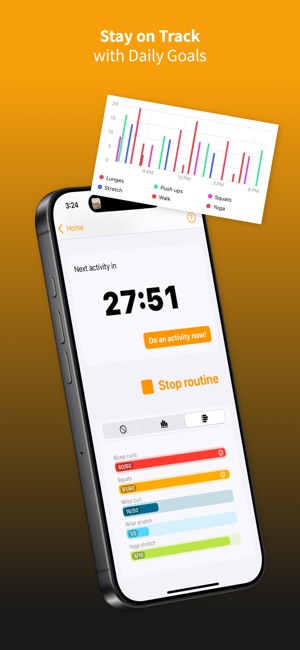
Credit: apps.apple.com
Tips For Staying Consistent
Staying consistent with fitness reminders on your phone helps build a lasting habit. Small, steady steps matter most. Focus on clear, doable actions that fit your daily life. Consistency grows from planning and tracking your progress. Here are some useful tips to keep you on track.
Setting Realistic Goals
Choose goals that match your current fitness level. Avoid setting targets that feel too hard or too easy. Realistic goals keep you motivated and reduce frustration. Break big goals into smaller, simple tasks. This makes them easier to complete and celebrate. Use your phone reminders to nudge you toward these small wins daily.
Tracking Progress
Record your activities regularly to see how far you’ve come. Use fitness apps or notes on your phone to log workouts and steps. Tracking helps you spot patterns and improve over time. Celebrate progress, no matter how small. It encourages you to keep going. Set reminders to review your progress weekly for steady growth.
Frequently Asked Questions
How Do I Set Fitness Reminders On My Phone?
Open your phone’s clock or reminder app. Create a new reminder. Set the time and frequency for your fitness activity. Save it, and your phone will notify you.
Can Fitness Apps Send Workout Reminders?
Yes, many fitness apps offer customizable workout reminders. You can set daily or weekly notifications. These help keep you motivated and consistent with your exercise routine.
What Is The Best Time To Set Fitness Reminders?
Choose a time that fits your daily schedule. Morning or evening often works best. Consistency helps form a healthy exercise habit over time.
Can I Customize Fitness Reminder Notifications?
Yes, most phones and fitness apps allow customization. You can change alert sounds, vibration, and reminder text. This personalization makes reminders more effective and engaging.
Conclusion
Setting fitness reminders on your phone helps you stay active daily. These reminders keep your goals clear and your routine steady. You can choose times that fit your schedule best. Small, regular steps lead to big health improvements. Remember, consistency matters more than intensity.
Use your phone as a simple tool to boost your fitness journey. Start today, and feel the difference over time.







