
Are you planning to design or renovate your gym space and want everything to fit perfectly? Finding the right Gym Equipment CAD Blocks can save you hours of guesswork and help you create a clear, detailed layout.
Imagine having precise, ready-to-use drawings that show exactly where each machine and weight rack should go. This isn’t just about making your gym look good—it’s about making your space efficient, safe, and inviting for everyone who walks through the door.
Keep reading, and you’ll discover how these CAD blocks can transform your gym design process from stressful to seamless.

Credit: cadbull.com
What Are Gym Equipment Cad Blocks?
Gym equipment CAD blocks are digital drawings used in design software. These blocks represent various gym machines and tools in detailed, scaled formats. Architects, designers, and engineers use them to create accurate gym layouts quickly. They save time and improve precision in planning gym spaces.
What Do Gym Equipment Cad Blocks Include?
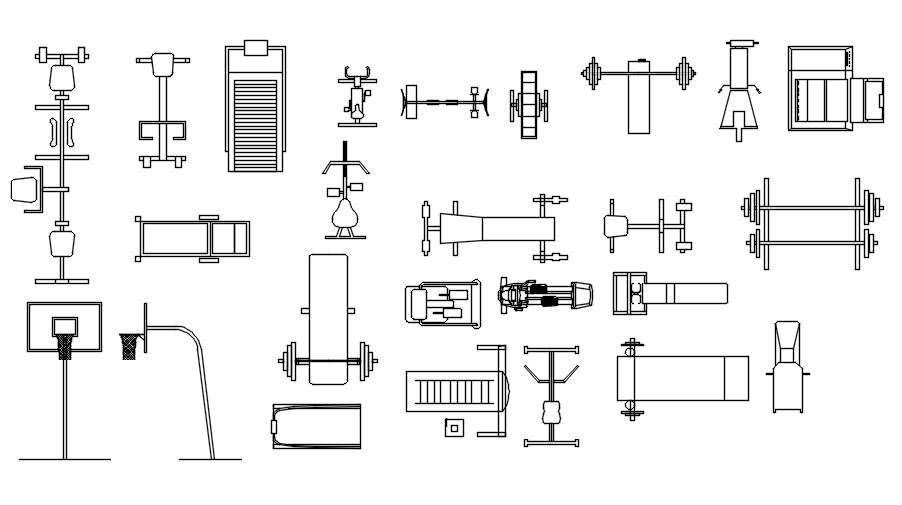
These blocks include detailed outlines of gym machines like treadmills, bikes, and weights. Each block shows the equipment’s shape, size, and position. This helps designers visualize how the equipment fits in a room. Blocks can also feature different views, such as top, side, and front.
Why Use Gym Equipment Cad Blocks?
CAD blocks speed up the design process. They reduce errors by providing precise measurements. Designers can easily move and arrange equipment in the digital plan. This allows better space management and efficient gym layouts. Blocks also help in sharing plans with clients or builders.
Where To Find Gym Equipment Cad Blocks?
Many websites offer free and paid CAD block libraries. Some manufacturers provide official blocks of their machines. Design software often comes with basic gym equipment blocks. Users can also create custom blocks to fit specific needs.
Benefits Of Using Cad Blocks For Gym Design
Using CAD blocks for gym design offers several clear advantages that can elevate your project from concept to reality with greater ease. These pre-drawn, scalable gym equipment models help you visualize layouts faster and with more detail. They ensure your design process stays smooth and efficient, saving you from common pitfalls that occur when starting from scratch.
Time-saving In Design Process
CAD blocks let you add gym equipment instantly without drawing each piece individually. This speeds up layout planning, allowing you to focus on overall design flow. Imagine cutting your design time in half by simply dragging and dropping ready-made elements.
You can quickly test different configurations to find the best use of space. Have you ever spent hours sketching the same treadmill just to realize it doesn’t fit? CAD blocks prevent that frustration by providing accurate, ready-to-use models.
Enhanced Accuracy And Precision
Precision is key when fitting gym equipment into limited spaces. CAD blocks come with exact dimensions, so your design matches reality perfectly. This reduces errors during installation and ensures equipment fits comfortably without overcrowding.
Using these blocks helps avoid costly mistakes. For example, you won’t have to reorder equipment because it doesn’t fit or clashes with emergency exits. How much smoother would your project run if every measurement was spot on from the start?
Cost Efficiency In Planning
Planning with CAD blocks can save money by reducing the need for physical prototypes and revisions. You can spot potential layout issues early, avoiding expensive changes later. This upfront clarity helps you stick to your budget and timeline.
Moreover, you can present clear, professional plans to clients or contractors. This improves communication and prevents misunderstandings that often lead to costly delays. Wouldn’t it be easier if everyone involved understood the gym layout perfectly before work begins?
Popular Types Of Gym Equipment Cad Blocks
Gym equipment CAD blocks help designers create accurate gym layouts. These blocks represent different types of gym machines and tools. Using the right CAD blocks saves time and improves design quality. Below are some popular types of gym equipment CAD blocks used in design projects.
Cardio Equipment Designs
Cardio equipment CAD blocks include treadmills, stationary bikes, ellipticals, and rowing machines. These blocks show the exact shape and size of each machine. Designers use them to plan gym spaces for smooth flow and comfort. Cardio equipment blocks help ensure enough space for users to move safely.
Strength Training Machines
Strength training machine CAD blocks feature leg presses, chest presses, cable machines, and squat racks. These blocks show details like handles and seats for precise placement. Strength machines take more space, so accurate blocks help optimize gym layout. Designers can arrange machines to avoid crowding and improve workout zones.
Free Weights And Accessories
Free weights CAD blocks include dumbbells, barbells, weight plates, and racks. Accessories like benches and mats also have detailed blocks. These blocks show the size and position of weights and benches. Designers use them to create safe and functional free weight areas. Proper spacing and organization enhance gym usability.

Credit: cadbull.com
How To Find Free Gym Equipment Cad Blocks
Finding free gym equipment CAD blocks can save you both time and money, especially if you need detailed and accurate designs for your projects. Many designers and architects look for these resources to quickly add professional-grade models into their plans without starting from scratch. But where exactly should you look, and how can you be sure the CAD blocks you find are reliable?
Reliable Online Resources
Several websites specialize in providing free CAD blocks, including gym equipment models. Sites like CADdetails, CADblocksfree, and Bibliocad offer extensive libraries that you can browse by category. These platforms often verify the quality of their downloads, so you can trust the files you get.
Make sure to check if the site updates its content regularly. Outdated files might cause compatibility issues with your CAD software or lack the precision you need. Have you ever downloaded a block only to find it didn’t fit your project scale? Avoid that by reading user reviews when available.
Community Forums And Sharing Platforms
Communities such as Reddit’s r/CAD, Autodesk forums, and GrabCAD are treasure troves for free CAD blocks shared by other users. You can ask for specific gym equipment blocks and often get custom-made files from experienced members.
Engaging with these communities helps you understand what others consider quality and useful. Plus, you might discover tips on modifying blocks to better suit your needs. Don’t hesitate to share your experiences or request feedback on your designs here.
Tips For Evaluating Cad Block Quality
Not every free CAD block will meet your standards. Check the block’s layer organization, dimensions, and level of detail before adding it to your project. A well-structured CAD block is easier to edit and integrates smoothly into your workflow.
Open the file in your CAD software and zoom in to inspect the details. Are the lines clean? Is the scale realistic? If the block looks sloppy or incomplete, it might cost you more time fixing it than creating your own.
Have you ever wasted hours on a block that didn’t work? Learning to spot quality early can save you frustration and keep your projects on track.
Steps To Download And Use Cad Blocks
Downloading and using Gym Equipment CAD blocks can streamline your design process and save you valuable time. Knowing how to select the right files and integrate them smoothly into your projects is essential. Let’s walk through simple yet effective steps to get you started with these CAD blocks.
Choosing The Right File Format
CAD blocks come in various file formats such as DWG, DXF, and sometimes SVG. Your choice depends on the design software you use. For example, AutoCAD works best with DWG and DXF files.
Think about compatibility first. If you’re unsure which format suits your software, check the software’s documentation or support forums. This saves frustration later and keeps your workflow smooth.
Importing Cad Blocks Into Design Software
Once you have the correct file, importing it into your design software is straightforward. Most programs have an “Insert” or “Import” option in the menu.
Locate your downloaded CAD block, select it, and place it into your workspace. Pay attention to scale and orientation—incorrect scale can ruin your layout. Have you ever placed a block only to realize it’s too big or too small? Adjusting this immediately saves a lot of headache.
Customizing Cad Blocks For Personalized Use
CAD blocks are not one-size-fits-all. You can edit them to fit your specific project needs. Change colors, add or remove elements, or adjust dimensions to match your design.
Customizing helps you make the block truly yours and can improve clarity in your plans. Don’t hesitate to experiment with minor tweaks; it often leads to better results and a more professional outcome.
Legal Considerations And Licensing
Using Gym Equipment CAD blocks in your projects can save you time and effort, but understanding the legal side is crucial. Ignoring licensing rules can lead to serious issues. Let’s break down what you need to know about legal considerations and licensing to keep your work safe and professional.
Understanding Copyright And Permissions
CAD blocks are often protected by copyright laws, meaning you can’t just use or share them freely. Before downloading or using a gym equipment CAD block, check its source and licensing terms carefully. Some creators allow free use with restrictions, while others require explicit permission or a purchase.
Have you ever assumed a free download was safe to use, only to find out later it wasn’t? That’s why verifying permissions upfront saves you from headaches down the line.
Best Practices For Attribution
If the CAD block requires attribution, make sure to credit the original creator properly. This usually means including the creator’s name and the source either in your project documentation or somewhere visible in your design files.
Attribution isn’t just about following rules—it’s about respecting the work of others. It builds trust and can open doors to future collaborations. Always check the exact format the license asks for to avoid accidental misuse.
Avoiding Legal Pitfalls
Some common legal pitfalls include using CAD blocks without permission or ignoring license restrictions like non-commercial use only. These mistakes can lead to takedown notices, fines, or worse. Always read the fine print and keep records of your permissions.
Think about how you would feel if someone used your original work without asking. Treat others’ CAD blocks with the same respect. When in doubt, reach out to the creator for clarification before using any CAD block.
Future Trends In Gym Equipment Cad Design
The future of gym equipment CAD design is bright and full of innovation. Designers use new technologies to create better, safer, and more efficient gym machines. These trends focus on improving user experience and manufacturing processes. They also aim to reduce costs and environmental impact. Below are some key trends shaping the future of gym equipment design.
Integration With Virtual Reality
Virtual reality (VR) allows designers to create and test gym equipment in a digital space. This helps spot design flaws before building physical models. VR can simulate real-life use and user interaction. It allows trainers and users to experience new equipment virtually. This saves time and reduces development costs. VR also offers immersive training programs paired with the equipment.
Advancements In 3d Printing Technology
3D printing speeds up the production of gym equipment parts. Complex shapes become easier to manufacture with this technology. Designers can create prototypes quickly for testing and feedback. Custom parts and small batches are more affordable. This technology reduces waste and material use. It supports rapid innovation and personalized equipment design.
Sustainability And Eco-friendly Designs
Eco-friendly materials are gaining importance in gym equipment design. CAD tools help select sustainable components and plan for recycling. Lightweight designs reduce energy use during manufacturing and transport. Many manufacturers focus on durability to extend product life. Sustainable design lowers the carbon footprint of gym equipment.
Credit: cadbull.com
Frequently Asked Questions
What Are Gym Equipment Cad Blocks?
Gym Equipment CAD Blocks are digital drawings of gym machines. They are used in architectural and interior design software. These blocks help designers create accurate gym layouts quickly and efficiently. They include various gym equipment like treadmills, weights, and benches.
Where Can I Find Free Gym Equipment Cad Blocks?
Free Gym Equipment CAD Blocks are available on websites like CADdetails, GrabCAD, and CAD Blocks Free. These platforms offer downloadable files compatible with AutoCAD and other design software. Always check the license for commercial use before downloading.
How To Use Gym Equipment Cad Blocks In Designs?
Import the CAD block file into your CAD software. Place the equipment blocks according to your gym layout plan. Adjust the scale and position to fit your design. This helps visualize space and ensures proper equipment placement.
Why Use Cad Blocks For Gym Equipment Design?
Using CAD Blocks saves time and improves accuracy in gym design projects. They provide standardized, detailed representations of equipment. This enhances communication between designers, clients, and contractors. CAD Blocks also help prevent layout errors and optimize space.
Conclusion
Gym equipment CAD blocks save time and improve design accuracy. They help create clear, detailed gym plans quickly. Using these blocks makes teamwork easier and reduces mistakes. Designers and architects can focus on creativity, not on drawing basics. Free and paid options suit different project needs.
Overall, CAD blocks are useful tools for anyone designing gym spaces. Try using them to make your work smoother and faster. Simple, smart, and effective.







