
Are you ready to take your workouts to the next level without spending a dime? The Apple Fitness Plus free trial gives you a chance to explore a world of guided workouts tailored just for you.
Whether you’re a beginner or a fitness pro, this trial lets you see how easy and fun staying active can be. Keep reading to discover how you can start your free trial today and unlock a healthier, stronger you.
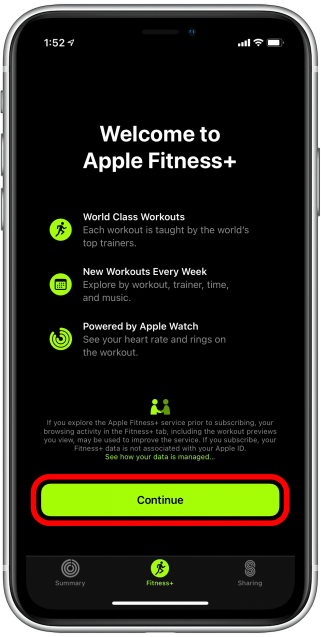
Credit: www.iphonelife.com
What Is Apple Fitness Plus?
Apple Fitness Plus is a fitness service designed to help users stay active at home. It offers guided workouts led by expert trainers. The service works seamlessly with Apple Watch, providing real-time metrics during exercise.
Users can choose from a variety of workout types and durations. The service adapts to different fitness levels, making it suitable for beginners and advanced users alike.
What Workouts Are Available On Apple Fitness Plus?
- High-Intensity Interval Training (HIIT)
- Yoga
- Strength Training
- Core Workouts
- Dance
- Mindful Cooldowns
- Rowing
- Treadmill
- Cycling
How Does Apple Fitness Plus Work?
Apple Fitness Plus connects with your Apple Watch during workouts. It shows heart rate and calories burned on screen. This helps you track progress and stay motivated.
Workouts can be done on iPhone, iPad, or Apple TV. You can select sessions by time, trainer, or workout type. The service updates weekly with new workouts.
Who Can Use Apple Fitness Plus?
Anyone with an Apple Watch Series 3 or later can subscribe. It is available in multiple countries and supports several languages. The service fits different fitness levels and goals.
Credit: www.igeeksblog.com
How To Access The Free Trial
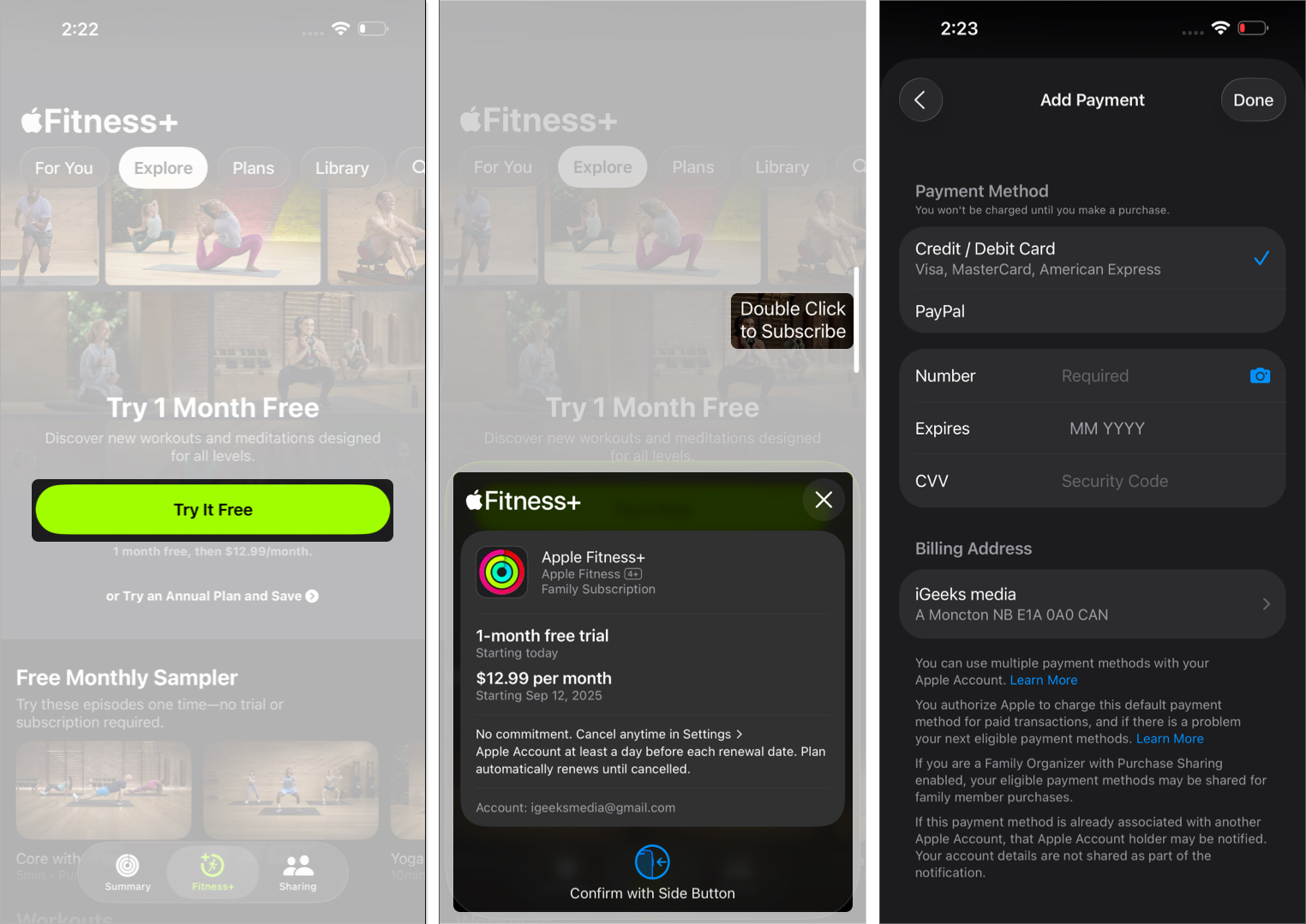
Accessing the Apple Fitness Plus free trial is straightforward, but it helps to know exactly what you need before you start. You can try out all the workouts and features without paying a dime, giving you a real feel for whether it fits your fitness goals. Let’s break down what makes you eligible and how to activate the trial on your devices.
Eligibility Criteria
Not everyone qualifies for the Apple Fitness Plus free trial. Here’s what you need to check before you dive in:
- Apple Device:You must have an iPhone, iPad, or Apple TV that supports the Fitness Plus app.
- Operating System:Your device should be running iOS 14.3 or later, iPadOS 14.3 or later, or tvOS 14.3 or later.
- Apple ID:You need an active Apple ID with payment information set up, even though the trial is free.
- Watch Requirement:An Apple Watch Series 3 or later paired with your device is necessary to use the service.
- New Subscribers:Free trials are available only to users who haven’t previously subscribed to Apple Fitness Plus.
Checking these points first saves you from running into issues during activation. Do you already have the right Apple Watch and device? If not, consider if upgrading is worth it for the trial experience.
Step-by-step Activation Guide
Activating the free trial is quick and easy. Here’s how to get started immediately:
- Open the Fitnessapp on your iPhone, iPad, or Apple TV.
- Tap on the Fitness Plustab at the bottom of the screen.
- Look for the option that says Start Free Trialand tap it.
- Follow the on-screen prompts to confirm your subscription with your Apple ID.
- Make sure your Apple Watch is paired and nearby during this process.
- Once confirmed, you can immediately explore all the workout videos and features.
Remember, the trial lasts for one month, giving you plenty of time to try different workouts and see how they fit your routine. You can cancel anytime before the trial ends if it’s not for you, avoiding any charges.
Have you tried activating a free trial for a fitness app before? How did that experience shape your workout habits? This trial might just be the push you need to make fitness a daily habit.
Exploring Workout Categories
Apple Fitness Plus offers a variety of workout categories. Each type fits different fitness levels and goals. Exploring these categories helps find the right workout for you.
The workouts are easy to follow. They combine expert guidance with clear visuals. Whether you want to build strength or relax, there is something for everyone.
Cardio And Hiit
Cardio and HIIT workouts focus on heart health and endurance. They include fast-paced exercises that raise your heart rate quickly. These workouts burn calories and improve stamina.
HIIT uses short bursts of intense activity with rest periods. This style helps burn fat efficiently. These sessions last from 10 to 30 minutes, perfect for busy schedules.
Strength Training
Strength training builds muscle and tones your body. It uses weights, resistance bands, or body weight. These workouts improve bone health and boost metabolism.
Sessions vary from beginner to advanced levels. Trainers guide proper form and safe techniques. Consistent strength training increases overall body strength.
Yoga And Mindfulness
Yoga and mindfulness workouts calm your mind and stretch your body. They improve flexibility, balance, and mental focus. These sessions include breathing exercises and guided meditation.
Yoga classes range from gentle stretches to more challenging poses. Mindfulness practices reduce stress and promote relaxation. This category suits all ages and fitness levels.
Dance And Core Workouts
Dance workouts make exercise fun and energetic. They combine rhythm and movement to boost coordination and burn calories. These sessions lift your mood and increase endurance.
Core workouts target the abdominal and back muscles. They strengthen your posture and improve stability. These exercises help prevent injuries and support daily activities.
Personalized Fitness Experience
Apple Fitness Plus offers a fitness journey tailored just for you. It adapts to your pace, goals, and preferences. Every workout feels more connected and personal, making exercise more enjoyable and effective.
Integration With Apple Watch
Apple Fitness Plus works closely with your Apple Watch. It uses data from your watch to customize workouts. Your heart rate, calories burned, and activity levels sync seamlessly. This connection helps deliver workouts that match your fitness level and progress.
Real-time Metrics And Feedback
During workouts, you see live metrics on your screen. This includes heart rate, calories, and exercise minutes. Real-time feedback helps you adjust intensity. It keeps you motivated and aware of your performance. This instant insight encourages better results and safer training.
Benefits Of Apple Fitness Plus
Apple Fitness Plus offers many benefits that suit different lifestyles and fitness levels. It helps users stay active with easy access and flexible workout options. The service supports personal goals and keeps users motivated through its features.
Convenience And Accessibility
Work out anytime, anywhere using Apple devices. No need for a gym or special equipment. Workouts fit into busy schedules with short and long sessions. The service syncs with Apple Watch to track progress easily. Users can join classes at home or on the go.
Variety And Customization
Choose from many workout types, including yoga, cycling, and strength training. Trainers offer modifications for beginners and advanced users. Users can pick music styles that match their taste. New workouts appear regularly to keep routines fresh. Personalized suggestions help match workouts to fitness levels.
Motivation And Community
Apple Fitness Plus creates a sense of connection through shared challenges. Visual progress and achievements encourage users to keep going. Trainers offer real-time encouragement during sessions. Integration with Apple Watch helps celebrate milestones. Users feel part of a supportive fitness community.
Credit: communityhub.strava.com
Tips To Maximize Your Free Trial
Trying out Apple Fitness Plus with a free trial is a great way to see if it fits your fitness style. To get the most out of this trial, you need a plan that keeps you motivated and consistent. Here are some tips that can help you turn those free days into real progress.
Setting Fitness Goals
Start by deciding what you want to achieve during your free trial. Are you aiming to build strength, improve flexibility, or boost endurance? Setting clear, specific goals helps you pick workouts that match your needs.
Write down your goals and check them often. This keeps you focused and shows you how much you’ve improved. For example, if you want to do more push-ups, track your numbers each week to see your progress.
Creating A Workout Schedule
Plan your workout times like appointments you can’t miss. Consistency beats intensity when you’re starting out. Block out 20 to 30 minutes several days a week to stay on track.
Mix workout types to avoid burnout—balance cardio, strength, and stretching sessions. This variety not only keeps things interesting but also improves overall fitness. Have you noticed how skipping workouts makes it harder to restart? A set schedule helps prevent that.
Exploring Different Instructors
Apple Fitness Plus offers a range of trainers with unique styles. Try sessions with different instructors to find whose coaching motivates you the most. You might connect better with one who explains moves clearly or keeps the energy high.
Don’t hesitate to switch it up if a class feels too easy or too hard. Testing various instructors also exposes you to new techniques and workout styles. Which instructor’s voice pushes you harder or makes you smile during tough sets?
Transitioning To A Subscription
After enjoying the Apple Fitness Plus free trial, you may want to keep using the service. Transitioning to a subscription is simple and offers many choices. Understanding your options helps you pick the best plan for your needs. This guide explains the subscription options and cost factors.
Subscription Options
Apple Fitness Plus offers flexible subscription plans. You can subscribe monthly or yearly. Both plans give full access to all workouts and features.
- Monthly subscription: Pay each month with no long-term commitment.
- Yearly subscription: Pay once a year and save money compared to monthly plans.
- Family sharing: Share one subscription with up to six family members.
The service works on Apple devices like iPhone, iPad, and Apple TV. Choose the plan that fits your workout habits and budget.
Cost And Value Considerations
The monthly subscription costs $9.99. The yearly plan costs $79.99. Yearly plans save about 33% compared to monthly payments.
| Plan | Cost | Cost per Month |
|---|---|---|
| Monthly | $9.99 | $9.99 |
| Yearly | $79.99 | $6.67 |
Think about how often you will use the workouts. A yearly plan is good if you use Apple Fitness Plus regularly. Monthly plans are better if you want flexibility.
Access to a wide range of workouts and expert trainers adds value. The app updates with new content weekly. This keeps workouts fresh and motivating.
User Testimonials And Reviews
User testimonials and reviews offer real insight into the Apple Fitness Plus free trial experience. They reveal how users feel about the workouts, trainers, and overall app performance. Reading these honest opinions helps potential users decide if the service fits their needs.
Many users highlight the variety of workout options. From beginner to advanced, the exercises cater to all fitness levels. The trainers receive praise for their clear instructions and motivating style. Users often mention how the app makes exercising more enjoyable and less intimidating.
Some reviews focus on the ease of use. The app’s interface is simple and user-friendly. People appreciate the integration with Apple Watch, which tracks progress smoothly. The music choices also get positive notes for keeping energy high during workouts.
Not every review is perfect. A few users say the trial period feels short to fully explore all features. Others wish for more personalized workout plans. Still, most agree the free trial provides a solid introduction to Apple Fitness Plus.
User Experience Highlights
- Clear and motivating trainers
- Variety of workout types and levels
- Easy app navigation and setup
- Good music selection
- Seamless Apple Watch integration
Common Criticisms
- Trial period may feel brief
- Limited personalized workout options
- Some want more detailed progress tracking
Impact On Fitness Habits
Many users say the free trial helped build a workout routine. The convenience of guided sessions at home encourages consistency. The app’s motivation boosts confidence to stay active regularly.
Trying Apple Fitness Plus through the free trial often leads to longer subscriptions. Users feel they gain value and enjoy the variety offered. The trial acts as a low-risk chance to test the service thoroughly.
Troubleshooting Common Issues
Encountering issues during your Apple Fitness Plus free trial can be frustrating, especially when you’re eager to start your workouts. Understanding how to quickly troubleshoot common problems can save you time and keep your fitness journey on track. Let’s look at some straightforward ways to handle technical and account-related hurdles.
Technical Support
If your workouts won’t load or the app keeps crashing, the first thing to check is your internet connection. A stable Wi-Fi or cellular connection is crucial for streaming high-quality video sessions.
Sometimes, simply restarting your device can fix glitches. I once had the app freeze right before a workout, and a quick reboot got everything back on track.
Make sure your device’s software and the Fitness Plus app are updated to the latest versions. Outdated software often causes compatibility issues.
- Check your internet speed; slow connections affect streaming quality.
- Restart your iPhone, iPad, or Apple TV if the app is unresponsive.
- Update to the latest iOS, iPadOS, or tvOS version available.
- Reinstall the Fitness Plus app if problems persist.
Account And Subscription Queries
Have you confirmed that your Apple ID is signed in and linked to your Fitness Plus subscription? Sometimes, subscription issues are due to account mismatches.
If your free trial isn’t activating, double-check that you haven’t already used a trial with that Apple ID. Apple limits trials to one per account to prevent multiple free accesses.
Billing problems can also block your access. Ensure your payment method is valid and up to date in your Apple ID settings.
- Verify your Apple ID is signed in on the device.
- Check if your free trial is still available or previously used.
- Review your payment details for any errors or expired cards.
- Contact Apple Support directly if your subscription status looks correct but access is denied.
Have you ever faced a glitch that halted your workout? What did you do to fix it? Sharing your experience might help others facing the same issues.
Frequently Asked Questions
What Is Apple Fitness Plus Free Trial Duration?
Apple Fitness Plus offers a 1-month free trial for new users. This trial allows full access to all workouts and features. It helps users explore the service before committing to a subscription. After the trial, a monthly or annual plan is required to continue.
How To Start Apple Fitness Plus Free Trial?
To start the free trial, open the Fitness app on your iPhone or Apple Watch. Follow the prompts to activate the Apple Fitness Plus trial. You need an Apple ID and compatible device. No payment is charged during the trial period.
Can I Cancel Apple Fitness Plus Free Trial Anytime?
Yes, you can cancel the free trial anytime before it ends. Canceling prevents automatic subscription charges after the trial. Manage your subscription through your Apple ID settings. No cancellation fees apply during the trial period.
Who Is Eligible For Apple Fitness Plus Free Trial?
The free trial is available to new Apple Fitness Plus subscribers only. Users must have a compatible Apple device and valid Apple ID. Some promotions may extend eligibility. Check Apple’s official terms for the latest details.
Conclusion
Apple Fitness Plus free trial lets you explore many workouts. It helps you find exercises that fit your style. The trial gives a clear idea about the service. You can try different trainers and workout types. No risk, just a chance to see if it suits you.
Stay active and enjoy fitness in a fun way. Give your health a boost with this free option. Start small, grow strong, and feel better each day. Take the time to see how it works for you. Your fitness journey can begin without any cost.







