
Have you ever found yourself struggling to keep track of your workout intervals, losing focus, or even cutting your exercise sessions short because of poor time management? Imagine having a tool that keeps you on track, boosts your motivation, and helps you achieve your fitness goals more efficiently.
Enter the Workout Timer App, your new best friend in your fitness journey. This app is designed to transform how you approach your workouts, ensuring you get the most out of every session. Curious about how it can revolutionize your exercise routine?
Keep reading to discover the magic behind the Workout Timer App and how it can supercharge your fitness efforts.

Credit: apps.apple.com
Benefits Of Workout Timer Apps
Workout timer apps offer many benefits that help improve exercise routines. They make workouts more organized and easier to follow. These apps help users stay on track and get the best results.
Improved Workout Efficiency
Workout timer apps save time by managing exercise and rest periods. Users do not need to guess when to start or stop. This leads to shorter, more effective workouts. Efficiency increases as users complete all planned sets and reps on time.
Enhanced Focus And Motivation
Timers keep users focused on their exercises. No need to watch the clock constantly. This focus helps maintain good form and intensity. Seeing the timer count down motivates users to push harder. It creates a clear goal for each set or interval.
Accurate Interval Tracking
Workout timer apps track intervals precisely for each exercise phase. This accuracy ensures users follow their training plan exactly. It helps avoid resting too long or rushing through sets. Accurate timing improves workout quality and progress over time.
Key Features To Look For
Choosing the right workout timer app makes exercise more effective and enjoyable. The best apps have features that suit different workout styles and needs. These features help keep your sessions organized and motivate you to stay on track.
Customizable Intervals
Set your own work and rest times for each exercise. Change the number of rounds to fit your workout plan. This flexibility works well for many training types, like HIIT, circuit training, or yoga. Custom intervals let you control the pace and intensity easily.
User-friendly Interface
Find an app with a simple, clean design. Easy navigation helps you start workouts quickly. Large buttons and clear text reduce confusion during exercises. A user-friendly interface saves time and keeps focus on your workout.
Audio And Visual Alerts
Alerts tell you when to start, stop, or switch exercises. Sounds and vibrations keep you informed without looking at the screen. Visual signals, like flashing colors or countdowns, add extra guidance. These alerts keep your workout smooth and well-timed.
Progress Tracking
Track your workout history and improvements over time. See stats like total exercise time, calories burned, and completed sessions. Progress tracking helps you stay motivated and understand your fitness growth. Some apps also offer charts or summaries for easy review.
Types Of Workout Timers
Choosing the right workout timer can dramatically improve your exercise routine. Different types of workout timers cater to various training styles, helping you stay on track and maximize your performance. Understanding these options lets you pick a timer that fits your goals and workout preferences.
Hiit Timers
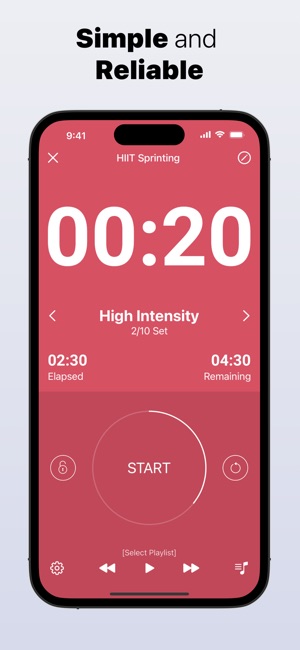
HIIT (High-Intensity Interval Training) timers are designed for fast-paced workouts with alternating periods of intense effort and rest. They keep you focused by signaling when to push hard and when to recover, which is crucial for maintaining intensity.
These timers often include customizable intervals so you can tailor your workout length and rest times. Have you ever lost track of time during your sprints? A HIIT timer solves that problem by keeping every second accounted for.
Tabata Timers
Tabata timers focus on a specific form of HIIT that uses 20 seconds of work followed by 10 seconds of rest, repeated eight times. This precise timing helps you maintain the rhythm required for Tabata training.
Using a Tabata timer ensures you don’t cheat yourself by extending rest periods or cutting work intervals short. It’s perfect if you want a quick, intense workout that fits into even the busiest schedule.
Circuit Training Timers
Circuit training timers guide you through multiple exercises with set work and rest periods for each station. They help you transition smoothly from one activity to the next without wasting time or energy.
With a circuit timer, you can set different durations for each exercise and rest phase, making your workout more structured and efficient. Do you find yourself fumbling with your phone between exercises? A dedicated circuit timer can keep you focused on moving.
Custom Interval Timers
Custom interval timers offer the most flexibility by allowing you to create your own workout structure with varied intervals and rest periods. This is ideal if your training involves unique combinations or if you want to experiment with different formats.
These timers empower you to design workouts that fit your personal fitness level and goals. Have you tried a timer that adapts to your needs rather than forcing you into a preset routine?

Credit: apps.apple.com
Integrating Timer Apps Into Your Routine
Integrating a workout timer app into your fitness routine can change the way you train. It keeps your sessions organized and helps you stay focused on your goals. But how do you make the most out of these apps in your daily workouts?
Setting Goals And Plans
Start by defining clear workout goals. Are you aiming to improve endurance, build strength, or increase flexibility? Your timer app should reflect these goals with customized intervals and rest periods.
Plan your sessions ahead using the app’s scheduling features. This keeps you accountable and reduces the chance of skipping workouts. Adjust your plans as you progress to stay challenged and motivated.
Combining With Fitness Trackers
Pair your timer app with a fitness tracker to get a full picture of your performance. Track your heart rate, calories burned, and steps taken alongside your timed intervals. This data helps you understand how your body responds to different workout phases.
Many timer apps sync seamlessly with popular fitness trackers. Use this integration to spot trends, improve recovery, and fine-tune your routines. Have you noticed how real-time feedback can push you to work harder?
Adapting Timers For Different Workouts
Not all workouts demand the same timing structure. High-intensity interval training (HIIT) needs short bursts and quick rests, while yoga flows benefit from longer holds and gentle pacing. Customize your timer app to match each workout style.
Experiment with different interval lengths and rest times to find what works best for you. This adaptability keeps your workouts fresh and prevents plateaus. What timer settings make your sessions feel both challenging and enjoyable?
Popular Workout Timer Apps To Try
If you want to boost your workout efficiency, using a workout timer app is a smart move. These apps keep you focused, track your intervals, and help you maintain a steady pace throughout your session. Picking the right one can make a difference in how motivated and organized you feel during your training.
Top Free Options
Many free workout timer apps offer solid features without costing a dime. Apps like Interval Timerand Secondsprovide customizable intervals and easy-to-use interfaces that fit most workout styles. They let you set up rounds, rest periods, and alerts, which is perfect if you want a no-frills, straightforward timer.
What’s great about free options is how they cover the basics well enough for beginners and casual users. Have you tried any free timer apps yet? You might be surprised at how much they can improve your workout flow without any investment.
Premium Features Worth Paying For
Some apps offer premium versions that add value beyond simple timers. Features like voice guidance, advanced scheduling, and integration with fitness trackers can enhance your experience. For example, Tabata Timer Proincludes custom workout plans and detailed statistics that help you analyze your progress.
Paying for premium features makes sense if you want to tailor your sessions or track long-term improvements. Ask yourself what you really need from a timer—does the added data or customization justify the cost for you?
Cross-platform Compatibility
Using a workout timer app that works across your devices keeps you flexible. Apps like Gymbosssync between iOS, Android, and even desktop platforms, so you can start a workout on your phone and continue on a tablet or computer. This is handy if you switch devices or workout locations often.
Think about where and how you exercise. Will a cross-platform app save you time and hassle? If you train at home, the gym, and outdoors, having your timer ready wherever you go can keep your routine consistent.
Credit: apps.apple.com
Troubleshooting Common Issues
Workout timer apps make training easier and more organized. Sometimes, users face issues that interrupt their sessions. Troubleshooting these common problems helps maintain smooth app performance. The following sections cover frequent issues and simple ways to fix them quickly.
Sync Problems
Sync problems occur when the app does not update data across devices. This can cause missing workout history or inaccurate timers. Check the internet connection first. A weak or unstable connection often blocks syncing. Restart the app to refresh the connection. Make sure the app is updated to the latest version. Sometimes, logging out and back in solves syncing errors. Verify the app has permission to access device data. Clear cache to remove old files that may cause conflicts.
Notification Failures
Notifications are crucial for alerting workout intervals. If alerts do not appear, check notification settings on your device. Ensure the app has permission to send notifications. Turn on sound and vibration for alerts. Disable “Do Not Disturb” mode during workouts. Restarting the device may reset notification functions. Update the app to fix bugs causing notification failures. Test notifications with a short timer to confirm they work.
Battery Drain Concerns
Workout timer apps can use more battery than expected. This is often due to background activity or constant screen use. Lower screen brightness to save power. Close other apps running in the background. Enable battery saver mode if available. Limit app permissions to only what is necessary. Use the app in offline mode if syncing is not needed. Check for app updates that improve battery efficiency.
Frequently Asked Questions
What Is A Workout Timer App Used For?
A workout timer app helps track exercise intervals, rest periods, and workout duration. It improves workout efficiency and timing accuracy. Users can customize timers to fit different workout styles, such as HIIT or circuit training. It keeps workouts organized and motivation high.
How Does A Workout Timer App Improve Fitness Results?
By managing workout and rest intervals precisely, the app optimizes exercise intensity. It prevents overtraining and ensures proper recovery. This leads to better endurance, strength, and overall fitness progress. Consistent timing increases workout effectiveness and helps users stay focused on goals.
Are Workout Timer Apps Suitable For Beginners?
Yes, workout timer apps are beginner-friendly. They offer easy setup and customizable timers to match fitness levels. Beginners can follow guided intervals and gradually increase workout intensity. These apps help build routine and confidence during exercise sessions.
Can I Use A Workout Timer App For Multiple Exercises?
Absolutely. Workout timer apps allow users to set timers for various exercises and routines. You can create custom circuits with specific work and rest periods for each move. This flexibility supports diverse workout plans and keeps training engaging.
Conclusion
A workout timer app helps you stay on track and save time. It guides your exercises and rest periods clearly. You can focus more on your workout, not the clock. Using this app makes your routine simple and effective. Try it out to see how easy fitness can be.
Small tools like this make a big difference. Keep moving, stay consistent, and enjoy your progress.







