
Imagine a world where your music experience is seamless, your workouts are enhanced, and your daily routines are accompanied by the perfect soundtrack. With Beats Fit Pro, this isn’t just a dream—it’s your reality.
But to truly unlock the full potential of these innovative earbuds, you need a few insider tips. Are you curious about how to maximize their features, boost your audio experience, and ensure they fit seamlessly into your lifestyle? You’re in the right place.
In this guide, we’ll uncover the secrets that will make your Beats Fit Pro not just a gadget, but an essential companion in your daily life. Keep reading, because what you’re about to discover will transform the way you listen.

Credit: www.amazon.com
Choosing The Right Size
Choosing the right size for your Beats Fit Pro earbuds can make a big difference in sound quality and comfort. If your earbuds don’t fit well, you might miss out on bass or experience discomfort during long listening sessions. Finding the perfect size ensures you get the most from your investment and enjoy every beat without distraction.
Ear Tip Options
Beats Fit Pro come with multiple ear tip sizes to fit different ear shapes. Usually, you’ll find small, medium, and large options included in the box. Trying each size helps you discover which seals your ear canal best, blocking outside noise and improving sound clarity.
Don’t just pick the size that feels comfortable at first. A slightly snugger fit often delivers better bass and noise isolation. If you notice sound leaking or the earbuds slipping out, switch to a different tip size.
Ensuring A Secure Fit
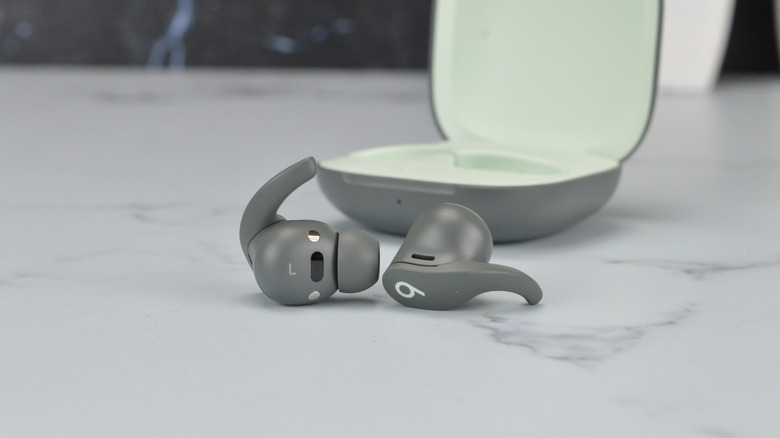
A secure fit keeps your earbuds in place during workouts, commutes, or daily activities. Beats Fit Pro feature flexible wingtips designed to anchor the earbuds inside your ear. Make sure the wingtip fits comfortably in the ear’s curve without causing pressure points.
Test your fit by moving your head or jogging lightly. If the earbuds shift or fall, adjust the position or try a different ear tip size. A secure fit means better sound and less chance of losing your earbuds.
Adjusting For Comfort
Comfort is key, especially if you wear earbuds for hours. Even the right size can feel uncomfortable if not positioned correctly. Gently twist the earbuds as you insert them to find the angle that feels natural and reduces ear fatigue.
Remember, your ears aren’t perfectly symmetrical. You might need different tip sizes or angles for each ear. Taking a moment to adjust can make listening more enjoyable and prevent soreness.
Maximizing Sound Quality
Maximizing sound quality with Beats Fit Pro ensures a better listening experience. Clear, rich audio makes music and calls more enjoyable. Small adjustments can boost how your earbuds perform. Focus on settings and care to get the best sound.
Optimizing Eq Settings
Adjust the equalizer (EQ) to match your music style. Increase bass for deeper beats or raise treble for clearer vocals. Use the Beats app or your device’s sound settings. Experiment with presets or create your own custom EQ. This personalizes sound to fit your ears and preferences.
Using Noise Cancellation
Turn on Active Noise Cancellation to block outside noise. It helps focus on music without distractions. Use Transparency mode to hear surroundings when needed. Adjust noise control based on your environment. Proper noise cancellation enhances sound clarity and depth.
Maintaining Audio Clarity
Keep earbuds clean to avoid muffled sound. Dirt and earwax can block sound openings. Store them in the case after use to protect from damage. Update firmware regularly to fix bugs and improve performance. Clear audio depends on both hardware care and software updates.
Battery And Charging Tips
Proper care of your Beats Fit Pro battery ensures longer use and better performance. Understanding charging habits helps maintain battery health. Small changes in usage can make a big difference over time.
Extending Battery Life
Keep your Beats Fit Pro away from extreme temperatures. Avoid leaving them in very hot or cold places. Lower the volume during use to save power. Turn off the earbuds when not in use. Use only one earbud if you need longer listening time. Regularly update the firmware for better battery management.
Efficient Charging Habits
Charge your earbuds before they reach zero percent. Avoid frequent full discharges. Use the original charging cable and case provided by Beats. Plug into a power source with stable voltage. Do not overcharge by leaving earbuds in the case too long. A quick top-up charge can keep the battery healthy.
Troubleshooting Charging Issues
Clean the charging contacts on earbuds and case regularly. Use a soft, dry cloth to remove dirt or dust. Restart your earbuds by placing them back in the case. Check the charging cable for damage or wear. Test with another compatible charger if charging fails. Reset the earbuds if problems continue after cleaning and testing.
Credit: www.bgr.com
Connectivity And Controls
Beats Fit Pro offers smooth connectivity and easy controls for a better listening experience. Understanding how to pair devices, use touch controls, and update firmware keeps your earbuds working well.
Pairing With Devices
To pair Beats Fit Pro, open the case near your device. A prompt appears on your screen. Tap “Connect” to link the earbuds. For non-Apple devices, turn on Bluetooth and select Beats Fit Pro from the list. The earbuds remember paired devices for quick connection next time.
Using Touch Controls
Touch controls on the earbuds let you manage music and calls without your phone. Tap once to play or pause music. Double-tap to skip a track. Press and hold to activate voice assistant or switch noise modes. These simple gestures keep your hands free.
Managing Firmware Updates
Firmware updates improve performance and fix bugs. Connect Beats Fit Pro to your phone and keep the case open. Updates download automatically through the Beats app or device settings. Check for updates regularly to ensure your earbuds stay current and work smoothly.
Cleaning And Maintenance
Keeping your Beats Fit Pro clean and well-maintained can extend their life and keep your sound experience crisp. Dirt, sweat, and oils can build up over time, affecting both comfort and performance. Knowing how to care for your earbuds properly makes a big difference.
Safe Cleaning Techniques
Start by gently wiping the earbuds with a soft, dry cloth. Avoid using harsh chemicals or abrasive materials that can damage the surface or internal components. For the ear tips, remove them carefully and rinse with warm water, then let them air dry completely before reattaching.
Use a dry cotton swab to clean small crevices and speaker meshes without pushing dirt inside. If you need to disinfect, lightly dampen a cloth with a 70% isopropyl alcohol solution and wipe down the exterior. Remember, never submerge the earbuds in water or any liquid.
Preventing Damage
Have you ever stored your earbuds in a tangled mess? This can lead to wire strain or broken components. Always handle your Beats Fit Pro with care—avoid pulling on the cords or dropping them.
Keep them away from extreme temperatures and moisture. Sweat-resistant doesn’t mean waterproof, so after workouts, wipe down your earbuds to remove excess moisture. Regular checks for wear and tear help catch issues before they become serious problems.
Storage Recommendations
Where you store your earbuds matters as much as how you clean them. Use the original charging case to protect your Beats Fit Pro from dust and accidental damage. The case also keeps them charged and ready to go.
If you don’t have the case handy, choose a small pouch or container that keeps them safe from dust and scratches. Avoid tossing them in bags or pockets with keys and coins that can cause scratches or dents. How often do you find your earbuds tangled or damaged in storage? A simple storage habit can save you from costly replacements.

Credit: www.amazon.com
Troubleshooting Common Problems
Even the best earbuds like the Beats Fit Pro can hit a snag now and then. Troubleshooting common problems quickly helps you get back to enjoying your music without frustration. Let’s dive into practical tips that tackle sound, fit, and connectivity issues you might face.
Fixing Sound Issues
If your Beats Fit Pro sound muffled or uneven, start by cleaning the ear tips and speaker meshes. Earwax and dust buildup often block sound flow, affecting audio quality.
Check your device’s volume settings too. Sometimes the problem lies in low volume or audio balance settings, not the earbuds themselves.
If you notice crackling or distortion, try resetting your earbuds. Hold down the system button for about 15 seconds until the LED flashes, then reconnect. This simple reset often clears minor glitches.
Resolving Fit Problems
Uncomfortable earbuds can ruin your listening experience. Beats Fit Pro come with multiple ear tip sizes—experiment with each to find the best seal and comfort.
If you still feel the earbuds slipping, repositioning them slightly or adjusting the ear fins can improve stability. A secure fit not only feels better but also enhances sound quality.
Think about your activities too. Running or jumping might require a snugger fit than casual listening. Have you noticed a particular size or positioning that stays put better during movement?
Handling Connectivity Glitches
Connectivity issues can be frustrating, but most are easy to fix. Start by toggling Bluetooth off and on your device to refresh the connection.
If that doesn’t work, forget the Beats Fit Pro in your Bluetooth settings and pair them again. This clears any pairing conflicts that might cause dropouts.
Keep your earbuds’ firmware updated. Beats regularly releases updates that improve connection stability and add features. Have you checked your firmware status recently?
Frequently Asked Questions
How Do I Optimize Beats Fit Pro Battery Life?
To optimize battery life, lower volume and disable Active Noise Cancelling when not needed. Use the charging case regularly. Update firmware for improved power management. Avoid extreme temperatures to preserve battery health.
What Are Best Settings For Beats Fit Pro Sound Quality?
For best sound, use the Beats app to customize EQ settings. Enable Spatial Audio for immersive experience. Ensure a proper ear tip fit to enhance bass and clarity. Keep firmware updated for sound improvements.
How Can I Improve Beats Fit Pro Bluetooth Connection?
Keep your device within 30 feet and avoid obstacles. Turn off other Bluetooth devices nearby to reduce interference. Reset Beats Fit Pro if connection issues persist. Keep firmware updated for better connectivity.
What’s The Proper Way To Clean Beats Fit Pro Earbuds?
Use a soft, dry cloth to wipe earbuds and case. Avoid water or cleaning solutions inside ear tips. Remove ear tips gently to clean earwax. Regular cleaning maintains sound quality and hygiene.
Conclusion
Beats Fit Pro offers great sound and comfort for daily use. Small tips can help you get the best from these earbuds. Adjust settings to fit your needs and enjoy longer battery life. Keep them clean and store safely to last longer.
Use controls smartly to manage calls and music smoothly. These simple steps make your experience better every time. Stay aware of updates to keep features fresh and useful. Enjoy your Beats Fit Pro with confidence and ease.







