
Are you tired of your AirPods Pro feeling a bit uncomfortable or slipping out when you least expect it? Finding the perfect fit can be a game changer for your listening experience, and that’s where the AirPods Pro Ear Tip Fit Test comes in.
Imagine enjoying your favorite tunes or podcasts without constantly adjusting your earbuds. Sounds great, right? You’ll discover how this simple test can make a world of difference in comfort and sound quality. Stay with us to learn how you can enhance your listening experience and make the most out of your AirPods Pro.
Why Ear Tip Fit Matters
Getting the right ear tip fit for your AirPods Pro isn’t just about comfort—it shapes your entire listening experience. If your ear tips don’t fit well, you might miss out on the true potential of the earbuds. Let’s dig into why fit matters so much and what you can expect when you get it right.
Impact On Comfort
Comfort is key when you wear earbuds for hours. Ill-fitting ear tips can cause pain, irritation, or even make you want to take them out quickly. A proper fit feels almost like the earbuds are part of you—secure but gentle.
I once struggled with sore ears after long calls until I switched to a smaller ear tip size. The difference was night and day—no more discomfort, and I could wear them all day without thinking about it. Don’t ignore how your ears feel; comfort directly affects how often you’ll use your AirPods Pro.
Effect On Sound Quality
Sound quality changes a lot with the right ear tip fit. If your ear tips aren’t sealing your ear canal well, you lose bass, clarity, and detail. It’s like trying to enjoy a movie with the volume too low.
Try this: wear your AirPods Pro with loose tips and then switch to snug-fitting ones. Notice how the music fills the space more, with richer lows and crisper highs? That’s the seal working its magic. Your ears will thank you for the upgrade.
Noise Isolation Benefits
One of the biggest perks of AirPods Pro is noise cancellation, but it only works if your ear tips fit right. Poor fit lets outside noise creep in, which can ruin your focus or listening experience.
Good noise isolation means less distraction and more immersion. You can enjoy your music, podcasts, or calls without constantly adjusting volume or background noise. Have you ever noticed how much better noise cancellation feels when the ear tips fit perfectly? That’s your cue to test and find your ideal size.
How To Perform The Fit Test
Ensuring the right fit for your AirPods Pro ear tips improves sound quality and comfort. Performing a fit test helps check if the ear tips seal well in your ears. This process can be done using the AirPods Pro’s built-in feature or by a simple manual check. Both methods are quick and easy to follow.
Using The Built-in Fit Test Feature
Connect your AirPods Pro to your iPhone or iPad. Go to the Bluetooth settings and tap the info icon next to your AirPods. Select “Ear Tip Fit Test” from the menu. Follow the instructions on the screen to play a short sound. The device listens and tells you if the fit is good or if you should try a different tip size.
This test uses internal microphones to detect sound leaks. A good seal means better noise cancellation and richer sound. Repeat the test for both ears to ensure a perfect fit.
Manual Fit Check Steps
- Insert the AirPods Pro in your ears with the current ear tips.
- Press down gently and move the earbuds slightly to create a snug fit.
- Check if outside noise is reduced significantly.
- If you hear too much outside noise, try switching to a different ear tip size.
- Repeat the process until the ear tips feel comfortable and block outside sounds well.
Comfort matters as much as sound quality. Use the fit test often to find the best ear tips for your ears.
Choosing The Right Ear Tip Size
Choosing the right ear tip size for your AirPods Pro is key to unlocking the best sound quality and comfort. The fit affects noise cancellation, audio clarity, and how long you can wear them without discomfort. Many users skip this step, but have you ever noticed your earbuds slipping or feeling sore after a short time?
Identifying Your Ear Shape
Your ear shape plays a major role in how well ear tips fit and seal. Ears vary in size, depth, and the shape of the ear canal, so a one-size-fits-all approach rarely works. You can check your ear shape by gently inserting the tip and feeling if it sits snugly without pressure.
Try wearing the AirPods Pro for a few minutes and notice if you feel any gaps or if the tips press too hard. If the earbuds feel loose or easily fall out, your ear tip might be too small. If you feel discomfort or pain, the tip could be too large.
Comparing Small, Medium, And Large Tips
Apple provides three sizes of ear tips—small, medium, and large—to cover most ear shapes. The medium size fits most people, but don’t assume it’s the best for you without testing.
| Tip Size | Fit Characteristics | When to Choose |
|---|---|---|
| Small | Looser fit, less deep insertion | If you have smaller ear canals or feel pressure with larger tips |
| Medium | Balanced fit and seal for average ear sizes | Most users find this size comfortable and secure |
| Large | Deeper fit, tighter seal | If smaller tips slip out or noise cancellation feels weak |
Have you tried all three sizes while playing music or using noise cancellation? The right size creates a comfortable seal that blocks outside noise without feeling tight. You should feel a gentle suction, not discomfort.
Remember, testing ear tips isn’t just about comfort—it directly impacts your listening experience. What happens if you settle for a quick fit rather than the perfect one?

Credit: www.youtube.com
Tips For Improving Fit And Comfort
Getting the right fit and comfort from your AirPods Pro ear tips makes a big difference. Proper fit improves sound quality and keeps the earbuds secure. Comfort helps you wear them longer without pain or irritation. Follow these simple tips to enhance your experience.
Proper Insertion Techniques
Hold the AirPod with the stem pointing down. Gently insert the ear tip into your ear canal. Rotate the AirPod slightly back and forth to create a good seal. Avoid pushing too hard to prevent discomfort. Check the fit using the Ear Tip Fit Test on your device.
Adjusting Position During Use
Small movements can improve comfort and sound. Try tilting the AirPods slightly up or down. Move the earbuds forward or backward inside your ear. Adjusting the angle may reduce pressure points. Take short breaks to relieve ear fatigue during long use.
Cleaning And Maintenance
Keep ear tips clean for hygiene and fit. Remove the ear tips and wipe them with a soft, dry cloth. Avoid using liquids that can damage the earbuds. Check for earwax buildup and clean gently if needed. Replace ear tips if they become worn or stretched out.
Troubleshooting Common Fit Issues
Getting the perfect fit for your AirPods Pro ear tips can sometimes feel tricky. Even after the initial fit test, you might face issues that affect comfort and sound quality. Let’s look at common problems and simple ways to fix them so your listening experience stays top-notch.
Dealing With Ear Fatigue
Ear fatigue happens when your ears feel sore or tired after wearing AirPods for a while. This usually means the ear tips are pressing too hard or don’t match your ear shape well.
Try switching to smaller or softer silicone tips to reduce pressure. Taking short breaks during long listening sessions can also give your ears a rest. Have you noticed if certain activities make your ears feel more tired?
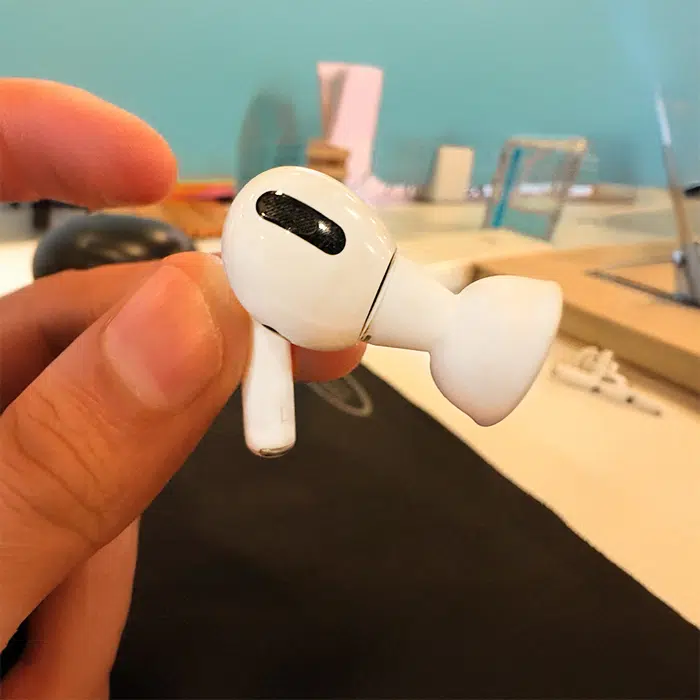
Fixing Loose Fit Problems
A loose fit causes the AirPods to slip out or feel unstable. This can ruin your listening experience and even cause you to lose an earbud.
- Make sure you try all the ear tip sizes included in the box—sometimes the medium size isn’t the best for your ears.
- Twist the earbud slightly as you insert it; this can help create a better seal.
- Consider third-party foam tips—they often provide a snugger fit than the standard silicone ones.
Have you tried these adjustments, or do you struggle to find ear tips that stay put?
Handling Sound Distortion
Sound distortion often means your ear tips aren’t sealing properly, letting outside noise in or muffling the audio.
Check for dirt or earwax buildup on your ear tips and clean them regularly. A tight seal is crucial—try adjusting the angle of the AirPods in your ears until the sound clears up.
Sometimes, switching to a different size or style of ear tip can improve audio clarity significantly. What’s your experience with sound quality after adjusting your fit?
Credit: www.igeeksblog.com
Alternatives To Stock Ear Tips
Stock ear tips that come with your AirPods Pro might not always provide the best fit or comfort. If you’ve ever felt they slip out or cause discomfort during long use, you’re not alone. Trying alternatives can significantly improve your listening experience and noise isolation.
Third-party Tips Options
Several brands offer replacement ear tips designed to fit AirPods Pro perfectly. These tips often come in different materials like memory foam or silicone, giving you choices beyond the standard silicone tips Apple provides.
Memory foam tips are popular because they expand to fit your ear canal snugly, creating a better seal and blocking outside noise more effectively. Brands like Comply and Dekoni offer well-reviewed foam tips that many users find more comfortable for extended wear.
Silicone tips from third parties may also be softer or have different shapes, catering to those who find the stock tips too firm or bulky. It’s worth trying a few types to see what suits your ears best.
Custom Molded Ear Tips
If you want the ultimate fit, custom molded ear tips are an option. These are made specifically from molds of your ear canals, ensuring a perfect seal and unmatched comfort.
Getting custom tips involves visiting an audiologist or using DIY kits that guide you through making your own mold. While pricier than off-the-shelf options, they can drastically improve sound quality and reduce ear fatigue.
Have you ever wondered how much better your AirPods Pro could sound with a fit tailored just for you? Custom molded tips answer that question with a personalized touch you won’t get from generic tips.

Credit: www.youtube.com
Frequently Asked Questions
What Is The Airpods Pro Ear Tip Fit Test?
The Ear Tip Fit Test checks if AirPods Pro tips seal properly in your ears. It ensures optimal sound and noise cancellation by measuring sound levels using built-in microphones.
How Do I Perform The Airpods Pro Fit Test?
Open Settings on your iPhone, go to Bluetooth, tap the “i” next to AirPods Pro. Select “Ear Tip Fit Test” and follow on-screen instructions for best fit.
Why Is The Airpods Pro Fit Test Important?
Proper fit improves sound quality, enhances noise cancellation, and ensures comfort. The fit test helps identify the best ear tip size for your ears.
Can I Use Any Ear Tips With Airpods Pro?
Apple recommends using original ear tips for optimal fit and performance. Third-party tips may affect comfort, sound quality, and noise cancellation effectiveness.
Conclusion
Finding the right AirPods Pro ear tip fit improves sound and comfort. It helps block outside noise better, making music clear. Test different sizes to see which feels best in your ears. A good fit stops earbuds from falling out during use.
Take time to try the fit test for the best experience. Small changes make a big difference in listening quality. Enjoy your AirPods Pro with comfort and better sound every day.







