
Looking for a way to boost your motivation every time you pick up your phone? Designing your own fitness wallpapers is a simple and powerful trick to keep your goals front and center.
Imagine unlocking your phone and instantly feeling inspired to move, sweat, and push harder. In this guide, you’ll discover easy steps to create stunning fitness wallpapers that speak directly to your drive and determination. Ready to turn your phone into a personal fitness coach?
Let’s dive in and make your screen a source of constant motivation.

Credit: www.freepik.com
Choosing The Right Theme
Choosing a theme that matches your fitness goals helps create a motivating wallpaper. Bright colors and simple designs keep the focus clear and inspiring. Select themes that feel personal and boost your workout mood.
Choosing the right theme for your fitness wallpaper is crucial. It sets the tone and inspires daily motivation. A well-chosen theme can energize your workout routine. It can also serve as a constant reminder to stay active. Let’s explore some engaging themes.Motivational Quotes
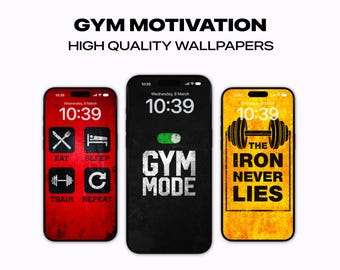
Include quotes that inspire action. Simple words can ignite passion. Choose quotes that resonate with your fitness goals. They can lift your spirits on tough days. Make sure the text is legible and clear. Use bold fonts with contrasting backgrounds.Fitness Equipment Imagery
Highlight images of gym equipment. Dumbbells, yoga mats, and kettlebells are great choices. These images can remind you of your commitment. They symbolize strength and dedication. Keep the images simple and focused. Avoid clutter for a clean look.Active Lifestyle Scenes
Capture the essence of an active life. Use images of running, cycling, or hiking. These scenes evoke a sense of movement. They can inspire you to stay active daily. Choose vibrant colors to create excitement. Ensure the images reflect real-life activities.Selecting Color Schemes
Choosing the right color scheme is crucial when designing fitness wallpapers for your phone. Colors affect mood, motivation, and how easily you can focus on your workout goals. Your color choices should match the vibe you want to create, whether it’s energizing you for a workout or helping you stay calm and focused.
Energizing Colors
Bright and bold colors like red, orange, and yellow can pump up your energy levels. These colors grab attention and make your wallpaper feel active and dynamic. If you want a wallpaper that motivates you to move, try combining fiery reds with crisp whites or blacks for a clean, powerful look.
Think about how these colors feel when you see them first thing in the morning. Do they make you want to jump out of bed and start your routine? If not, tweak the shades until they spark that reaction.
Calm And Focused Tones
Soft blues, greens, and purples create a calming atmosphere that helps you focus during yoga or meditation. These tones reduce stress and keep your mind clear. Using muted shades rather than bright ones can make your wallpaper feel more soothing and less distracting.
Have you noticed how some colors help you breathe easier? Choosing cooler tones might be just what you need to keep your workout sessions peaceful and centered.
Contrast And Readability
High contrast between text and background is essential for readability, especially on small phone screens. Dark text on a light background or vice versa ensures your motivational quotes or workout stats stand out clearly.
Test your design by viewing it on different phone models and lighting conditions. Can you read everything without straining your eyes? If not, adjust your colors until the information pops.
Remember, a stunning wallpaper is useless if you can’t quickly read the key details during your workout.
Incorporating Typography
Typography plays a key role in designing fitness wallpapers for phones. It helps deliver the message clearly and motivates the viewer. Choosing the right fonts and placing text well creates a strong visual impact. Good typography balances with the background image to keep the design clean and readable.
Font Styles For Impact
Select fonts that reflect energy and strength. Bold, sans-serif fonts work well for fitness themes. They look modern and are easy to read on small screens. Avoid overly decorative fonts that distract from the message. Use a maximum of two font styles to maintain clarity. Contrast between fonts adds emphasis to important words.
Text Placement Strategies
Place text where it does not cover key parts of the image. Use the empty or less busy areas for better visibility. Centered text grabs attention but can block the main image. Aligning text to the top or bottom corners often works better. Use padding or margins to prevent text from touching screen edges.
Balancing Text And Imagery
Keep a good balance between text and background visuals. Text should complement the image, not overpower it. Use transparency or shadow effects to improve text readability. Adjust font size to match the wallpaper’s resolution and aspect ratio. Test the design on different phone screens to ensure clear visibility.

Credit: www.freepik.com
Using Visual Elements
Visual elements are key to making fitness wallpapers eye-catching and motivating. They guide the viewer’s focus and create a mood. Using the right visual components can make the design feel energetic and inspiring. Bright colors, strong shapes, and clear symbols help users connect with their fitness goals every time they unlock their phone.
Icons And Symbols
Icons and symbols quickly communicate fitness themes. Choose simple, recognizable icons like dumbbells, running shoes, or heartbeats. These small images add meaning without cluttering the screen. Use icons to highlight key ideas or to decorate the background subtly. Keep the style consistent to maintain a clean look.
Dynamic Shapes And Lines
Shapes and lines add movement and energy to your wallpaper. Curved lines suggest flow and flexibility, while sharp angles convey strength and focus. Use diagonal lines to create a sense of action. Combine circles and triangles for contrast and interest. Play with size and direction to keep the design lively but balanced.
Layering Techniques
Layering different elements creates depth and texture in your design. Place shapes, icons, and text on separate layers to control their interaction. Use transparency to blend layers smoothly. Overlapping elements can produce a 3D effect, making the wallpaper more engaging. Keep important parts clear and avoid overcrowding the screen.
Optimizing For Phone Screens
Designing fitness wallpapers for phone screens requires careful attention to how your images will appear on different devices. If your wallpaper doesn’t fit well or looks cluttered, it won’t motivate or inspire the user as intended. Optimizing your design ensures it looks sharp, clear, and visually appealing every time someone unlocks their phone.
Resolution And Dimensions
Choosing the right resolution is key to making your wallpaper look crisp. Most modern smartphones have high-definition screens, so aim for at least 1080 x 1920 pixels. This size fits most full HD displays without losing quality.
Remember, too large a file can slow down the phone or cause cropping issues. Try to keep the file size balanced by using formats like PNG or JPEG with moderate compression.
Aspect Ratios
Different phones have different screen shapes. The most common aspect ratios are 16:9, 18:9, and even 19.5:9 on newer models.
Design your wallpaper to work well within these ratios. Center your main fitness elements so they don’t get cut off on unusual screen sizes. Have you checked how your design looks on both tall and wider screens?
Avoiding Clutter
A busy wallpaper distracts rather than motivates. Keep your design simple by focusing on one or two main elements, like a motivational quote and a strong image.
Leave enough empty space around key features to make them stand out and let the phone’s icons and widgets remain visible.
When I designed my first fitness wallpaper, I filled every inch with text and images. The result? Users complained the home screen looked messy. Simplifying the design made it more user-friendly and visually attractive.
Tools And Software
Choosing the right tools and software makes designing fitness wallpapers easier. The right program lets you create sharp, colorful images that fit phone screens perfectly. Some tools suit beginners, while others offer advanced features for experienced designers. Templates and online resources can speed up the process. This section explores options for all skill levels.
Design Apps For Beginners
Simple design apps help beginners create fitness wallpapers quickly. These apps have easy-to-use interfaces and pre-made elements. They work well on phones and tablets. Popular choices include:
- Canva: Offers drag-and-drop features and fitness-themed templates.
- PicsArt: Good for editing photos and adding text.
- Adobe Spark: Simple tools for making stylish graphics.
These apps require little or no design experience. They are perfect for fast and fun wallpaper creation.
Advanced Editing Software
Advanced software provides full control over design details. These programs allow custom shapes, layers, and effects. They work best on computers. Common software includes:
- Adobe Photoshop: Industry standard for detailed image editing.
- CorelDRAW: Great for vector graphics and precise designs.
- Affinity Designer: Affordable alternative with powerful tools.
These tools suit users who want to create unique, professional wallpapers. They have a steeper learning curve but offer more options.
Online Resources And Templates
Online platforms offer ready-made templates and design elements. These resources save time and inspire creativity. Popular sites include:
- Freepik: Provides free and premium fitness graphics.
- Pexels: Offers high-quality free photos for backgrounds.
- Envato Elements: Subscription service with diverse templates.
Using templates is a smart way to get started or speed up design work. Customize colors, fonts, and images to fit your style.
Creating Personalized Designs
Creating personalized fitness wallpapers for your phone transforms a simple background into a daily motivator. It helps you stay connected to your fitness goals every time you unlock your device. Personal designs reflect your unique journey, making your phone a source of inspiration rather than just a gadget.
Incorporating User Goals
Start by thinking about your specific fitness goals. Are you focusing on strength, endurance, or flexibility? Tailor your wallpaper with motivational quotes or images that match your objectives.
You could include milestones like “Run 5K in 30 minutes” or “Do 50 push-ups” to keep your targets clear. This constant visual reminder can push you to stay committed. What goal do you want to see every day?
Customizing Colors And Text
Colors affect mood and energy. Choose vibrant hues like reds or oranges to boost motivation, or calming blues and greens if you prefer a relaxed vibe. Contrast your text with the background for easy readability.
Pick fonts that feel personal but stay simple enough to read quickly. You might try bold styles for important words or playful scripts for quotes. How does the color and font you choose make you feel about your workout?
Adding Personal Photos
Nothing beats the power of a personal photo. Use pictures from your favorite workout moments or progress shots to personalize your wallpaper. Seeing your own achievements can spark stronger motivation than any generic image.
Blend these photos with graphic elements or text to create a balanced design. Just ensure the photo doesn’t clutter the screen or hide important icons. What photo reminds you most of why you started your fitness journey?
Credit: www.etsy.com
Testing And Feedback
Testing and feedback are vital steps in designing fitness wallpapers for phones. They help ensure your design looks good and works well on various devices. Feedback from real users gives insights you might miss alone. It helps refine colors, fonts, and layouts to make wallpapers more appealing and functional.
Previewing On Devices
Check how your wallpaper appears on different phone models. Use both Android and iOS devices to catch variations. Pay attention to screen sizes, resolutions, and aspect ratios. See how your design adapts to portrait and landscape modes. This helps avoid cropping or distortion issues.
Gathering User Opinions
Share your wallpaper with friends or online communities. Ask simple questions about color, readability, and overall appeal. Collect honest feedback on what users like or dislike. Note suggestions for improvement and common themes. User opinions highlight areas that need adjustment or enhancement.
Making Iterative Improvements
Use feedback to make small, focused changes. Update colors, text size, or layout based on user input. Test each new version again on various devices. Repeat the cycle until your wallpaper looks polished and user-friendly. Iteration ensures a balanced and attractive final design.
Sharing And Distribution
Sharing and distributing your fitness wallpapers is essential to reach a wider audience. It helps your designs gain visibility and inspire others. Proper sharing channels boost your work’s impact and encourage downloads. Selecting the right platforms makes distribution easier and more effective.
Social Media Platforms
Social media is a powerful tool for sharing fitness wallpapers. Platforms like Instagram, Pinterest, and Facebook attract users interested in fitness and design. Share high-quality images with short descriptions to catch attention. Use relevant hashtags and tags to increase reach. Engage with followers through comments and messages to build a community.
Wallpaper Apps
Wallpaper apps offer a direct way to distribute your designs. Upload your wallpapers to apps like Zedge or Walli for easy access. These apps have large user bases searching for fresh wallpapers daily. Ensure your files meet app requirements for resolution and format. Regularly update your collection to keep users interested.
Community Engagement
Joining fitness and design communities helps spread your wallpapers naturally. Participate in forums and groups related to fitness, phone customization, and graphic design. Share your wallpapers and ask for feedback to improve. Collaborate with other creators to expand your reach. Hosting contests or challenges can boost engagement and visibility.
Frequently Asked Questions
How Do I Choose Colors For Fitness Wallpapers?
Pick vibrant and energetic colors like red, orange, or green. These colors motivate and create a lively fitness vibe. Use contrasting shades to make text and icons clear on your phone screen.
What Size Is Best For Phone Fitness Wallpapers?
Use a resolution of 1080 x 1920 pixels for most smartphones. This size ensures your wallpaper looks sharp and fits perfectly without distortion or cropping.
Which Tools Help Design Fitness Wallpapers Easily?
Try Canva, Adobe Spark, or Figma for simple and powerful design tools. These platforms offer fitness-themed templates and easy customization options for beginners and pros.
How Can I Add Motivational Quotes Effectively?
Place short, bold quotes in readable fonts with good contrast. Keep the text minimal and center-aligned to inspire users while keeping the design clean.
Conclusion
Designing fitness wallpapers for your phone can boost motivation daily. Choose clear images and simple designs that inspire action. Use colors that energize but do not distract. Keep the layout neat for easy viewing. Personal touches make your wallpaper unique and meaningful.
Regular updates keep your screen fresh and exciting. Small changes can create big motivation shifts. Start creating your perfect fitness wallpaper today. Enjoy a phone background that pushes you toward your goals.







