
Are you ready to take control of your health with just a few taps? The Fit Track Scale App makes tracking your weight, body fat, and overall fitness easier than ever.
Imagine having a personal health coach right in your pocket, helping you understand your body better and stay motivated every day. If you want simple, clear insights that push you closer to your goals, this app could be exactly what you need.
Keep reading to discover how the Fit Track Scale App can transform your fitness journey.
Fit Track Scale App Features
The Fit Track Scale App offers a variety of features to help track your health. It collects detailed body data and presents it clearly. The app supports easy navigation and connects smoothly with other fitness tools. These features work together to improve your health journey.
Comprehensive Health Metrics
The app measures more than just weight. It tracks body fat, muscle mass, water levels, and bone mass. Users get a full view of their health. It shows trends over time to help spot changes. This detailed data supports smarter health decisions.
User-friendly Interface
The app has a clean and simple design. Large buttons and clear text make it easy to use. Setting up the app takes just a few minutes. Users can quickly find the information they need. The interface suits all ages and skill levels.
Integration With Other Apps
Fit Track Scale App works with popular health apps. It connects with Apple Health, Google Fit, and Fitbit. Data syncs automatically, keeping all health info in one place. This helps users track progress without extra effort. Integration makes health tracking more complete and convenient.
Credit: apps.apple.com
Setting Up Your Fit Track Scale App
Setting up your Fit Track Scale app is simple and fast. This app helps you track your body data accurately. It works with your Fit Track scale to give detailed health insights.
Follow these easy steps to get started with the app and make the most of your scale.
Downloading And Installing
Go to the app store on your smartphone. Search for “Fit Track Scale app.” Choose the official app from the results. Tap the download or install button. Wait a few moments for the app to install. Open the app once installation finishes.
Initial Setup And Configuration
Create a new account or log in if you already have one. Enter your basic details like age, height, and gender. Set your goals if the app asks for them. Allow the app to access Bluetooth and notifications. This helps the scale communicate with your phone.
Syncing With Devices
Turn on your Fit Track scale. Make sure Bluetooth is active on your phone. Open the app and select the option to add a device. Choose your scale from the list of available devices. Wait for the app to connect and sync data. Now your scale and app work together perfectly.
Tracking Health Metrics
The Fit Track Scale App helps you watch many health numbers easily. Tracking these numbers helps you understand your body better. It shows changes over time so you can stay on track. The app gives clear data on weight, body makeup, and water levels. These details guide you to healthier habits.
Weight And Bmi Monitoring
The app records your weight each time you step on the scale. It also calculates your Body Mass Index (BMI). BMI shows if your weight is healthy for your height. Tracking weight and BMI regularly helps spot trends early. This information supports better decisions about diet and activity.
Body Composition Analysis
Fit Track Scale App measures fat, muscle, and bone mass in your body. This analysis shows what part of your weight is fat or muscle. Understanding body composition is key to improving fitness and health. The app tracks these numbers to see how your body changes. It helps you focus on building muscle or losing fat.
Hydration And Muscle Mass
The app also checks your hydration level. Water is important for all body functions. It shows how much water your body holds. Muscle mass is measured to track muscle growth or loss. Staying hydrated and maintaining muscle are signs of good health. The app makes it easy to watch these metrics daily.
Optimizing Your Health Goals
Optimizing your health goals with the Fit Track Scale App means making your fitness journey smarter and more tailored to your needs. This app is not just about tracking weight; it helps you set, monitor, and adjust goals based on real data. You can see clear progress and understand how your body changes over time.
Setting Personalized Goals
The Fit Track Scale App lets you create goals that fit your lifestyle and health needs. Whether you want to lose fat, build muscle, or improve your overall wellness, you can specify targets like body fat percentage, muscle mass, or hydration levels.
Personalizing your goals makes them more achievable and relevant. Think about what you want to improve the most and set clear, measurable targets. This keeps you motivated and focused on what really matters to your body.
Monitoring Progress Over Time
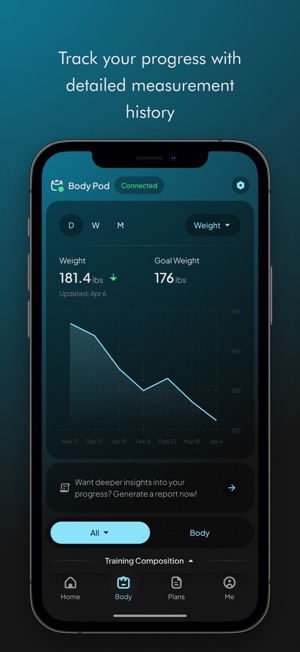
Tracking your progress consistently is key to staying on course. The app provides detailed charts and insights, showing how your body composition changes week by week.
This visual feedback helps you understand the impact of your diet and exercise choices. Imagine seeing your muscle mass increase or fat percentage drop—it’s proof that your efforts are working.
Adjusting Goals For Better Results
Sometimes, your initial goals might need tweaking based on your progress or lifestyle changes. The Fit Track Scale App makes it easy to update your targets as you learn more about your body’s response.
Ask yourself: Are your goals still realistic? Are you challenging yourself enough? Adjusting your goals ensures you stay motivated and continue making improvements without hitting plateaus.
Troubleshooting Common Issues
Facing issues with the Fit Track Scale app can be frustrating, especially when you rely on it to track your health data accurately. Understanding how to troubleshoot common problems helps you get back on track quickly. Let’s look at some typical challenges and practical fixes that can improve your app experience.
Connectivity Problems
One of the most frequent issues is the app not connecting to your Fit Track Scale. This usually happens because of Bluetooth interference or outdated app versions.
Try these tips to restore connection:
- Make sure Bluetooth is enabled on your phone and that the scale is within range.
- Restart both your phone and the scale to refresh the connection.
- Check for app updates – an outdated app might not sync properly.
- Forget the device in your Bluetooth settings and pair it again.
If you notice persistent connection drops, ask yourself: Is there a new device or electronic nearby that could interfere? Moving away from other electronics might help.
Inaccurate Readings
Nothing is more confusing than seeing numbers that don’t match your expectations. Inaccurate readings can happen due to improper scale placement or user error.
To get reliable data:
- Place the scale on a hard, flat surface – carpets or uneven floors skew results.
- Step on the scale barefoot and remain still until the reading stabilizes.
- Calibrate the scale regularly according to the app’s instructions.
Think about your routine: Are you measuring under consistent conditions? Tracking at the same time of day can also improve accuracy.
App Crashes And Bugs
App crashes can interrupt your progress and cause data loss. These bugs often arise from outdated software or conflicts with your phone’s operating system.
Here’s what you can do:
- Update the app to the latest version available.
- Clear the app cache and data in your phone settings.
- Reinstall the app if crashes continue.
- Ensure your phone’s OS is compatible with the app version.
Consider this: Have you installed any new apps recently that might conflict with Fit Track? Identifying such conflicts can save you time and frustration.

Credit: apps.apple.com
Comparing Fit Track With Competitors
Choosing the right health scale app can make a big difference in tracking your fitness journey. Fit Track stands out in a crowded market, but how does it really compare to other popular apps? Let’s look closely at what sets Fit Track apart, its pricing, and what users are saying to help you decide if it fits your needs.
Unique Selling Points
Fit Track uses advanced bioelectrical impedance analysis to provide detailed body composition data. This includes metrics like muscle mass, hydration levels, and bone density, which many competitors overlook.
The app also offers a sleek, user-friendly interface that syncs seamlessly with multiple devices. You can track progress over time with clear graphs and personalized health insights, which help you stay motivated.
Unlike some apps that focus only on weight, Fit Track gives a full health picture. Have you ever wondered why your weight stays the same despite losing fat? This app helps you understand those nuances.
Pricing And Value
| App | Cost | Features Included |
|---|---|---|
| Fit Track | Free basic, $4.99/month Premium | Full body metrics, trend reports, multi-device sync |
| Competitor A | $9.99/month | Weight tracking, limited body metrics |
| Competitor B | Free with ads | Basic weight and BMI tracking |
Fit Track’s premium plan offers more detailed health insights at less than half the price of some rivals. If you want in-depth data without a heavy subscription fee, it’s a strong contender.
User Reviews And Feedback
Many users praise Fit Track for its accuracy and ease of use. One user shared how the app helped them identify dehydration early and adjust their habits, improving overall wellness.
However, some users mention occasional syncing delays with certain devices. Despite that, the majority find the detailed reports worth the minor inconvenience.
Would you prefer an app that focuses just on weight, or one that helps you understand your body in more detail? The feedback suggests Fit Track leans toward the latter, offering real value for people serious about health.
Future Of Fit Track Scale App
The future of the Fit Track Scale App looks promising and full of potential. The app continues to evolve, aiming to support users in their health journey. New updates and features are in development to enhance user experience and data accuracy.
Fit Track Scale App plans to expand its reach and integrate with more devices. This helps users get a complete view of their health. Advancements in technology will also play a key role in improving the app’s functions.
Upcoming Features
- Improved body composition analysis for more precise results
- Personalized health tips based on user data
- Enhanced goal tracking with reminders and motivational prompts
- Integration with popular fitness apps for seamless data sharing
Expansion Plans
- Support for multiple languages to reach a global audience
- Compatibility with new smart scale models
- Partnerships with health and wellness platforms
- Availability on more mobile operating systems and devices
Technological Advancements
- Use of AI to provide deeper insights and predictions
- Enhanced Bluetooth connectivity for faster syncing
- Cloud-based data storage for secure and easy access
- Advanced sensors in scales for better measurement accuracy

Credit: apps.apple.com
Frequently Asked Questions
What Is The Fit Track Scale App Used For?
The Fit Track Scale App tracks body metrics like weight and body fat. It syncs data from Fit Track smart scales to your phone. This app helps monitor health progress easily and accurately over time.
How Does Fit Track Scale App Sync With Devices?
The app connects to Fit Track smart scales via Bluetooth. Once paired, it automatically transfers measurement data to your smartphone. This seamless sync allows instant access to health stats anytime.
Can Fit Track Scale App Track Multiple Users?
Yes, the app supports multiple user profiles. Each user’s data is stored separately for personalized tracking. This feature is ideal for families or groups sharing one scale.
Is The Fit Track Scale App Compatible With Smartphones?
The app works with most iOS and Android devices. It requires Bluetooth 4. 0 or higher for syncing. Regular updates improve compatibility and user experience.
Conclusion
The Fit Track Scale App helps you track your health easily. It shows clear data about your body and progress. You can set simple goals and watch your improvements daily. Using the app keeps you motivated and aware of your habits.
It works well with your scale and phone. Staying healthy becomes simpler with regular updates from the app. Try it to see how small changes add up over time. Your wellness journey gets better with clear, easy tracking.







